In this guide
- Run a fair pause test in five steps
- Flat sales after a pause can be true, or just early
- One week measures the delay, not the effect
- Pause a slice, and keep a control
- Track total sales, rank and share every week
- Rule out what can fake a flat result
- Read the result by its shape
- Restart on purpose, not in a panic
- What you can't fix
- Your pause test checklist
- Where we fit
- Authoritative resources
- Frequently asked questions
Key takeaways
Why sales can hold after you turn off Amazon ads, why a short pause misleads, and how to run a pause test you can trust.
- One seller paused campaigns that drove 60% to 70% of sales, and sales held.
- A reply in the same thread warned that one week is too short to see organic rank decay.
- A 2024 study of 4,800 Amazon searches found items ranked past 100th organically showing up as sponsored results.
- Amazon's own bidding guide says to limit changes while testing, so results tie to one change.
- The April 15, 2026 ad boycott lasted 24 hours, far too short to read rank effects.
"I turned off all those campaigns and found I'm getting basically the same sales volume for all products."
A seller wrote that on Amazon's Seller Forums in about November 2025. Six months later, another seller replied with the catch: "One week is too short to see organic rank decay."
Does flat sales after pausing Amazon ads prove the ads were wasted? Not yet. Organic rank can hold for weeks before it slips, so a one-week pause mostly measures the delay. Pause one slice, keep a control, and read four or more weeks of total sales, rank and search share before you decide.
Run a fair pause test in five steps
- Pick one slice to pause: branded terms, one product group, or one campaign type.
- Keep a matched slice running as your control.
- Run the test for at least four weeks, away from sale events.
- Track total sales, organic rank and search share every week.
- Read the shape of the result, then restart, trim or cut on purpose.
The number a pause test should move is total advertising cost of sales (ACoS): ad spend divided by all sales, paid and organic. Our pay-per-click (PPC) guide covers total ACoS and why it beats the ACoS on any single campaign.
Flat sales after a pause can be true, or just early
Both outcomes happen. Where you ranked before the pause decides which one you get.
The seller who started that thread said PPC had driven "about 60-70%" of total sales. Their organic rank was high on almost all major keywords. When the ads stopped, shoppers could still find the same products in the free results.
That pattern has a name among sellers. In a 2023 Sellers Ask Sellers thread, one seller wrote that "most of the advertising sales are probably just hijacking the organic sales." The same thread noted that this "probably makes those advertising metrics look a lot better than they actually are."
Attribution explains how that happens. An ad gets credit for a sale when the shopper clicked it first, inside the attribution window Amazon uses for that ad type. A shopper who searched your brand name and tapped the top ad was often yours already.
Other ad platforms see the same gap. A June 2026 paper on advertising in TikTok's markets found that paid-attributed conversions "may systematically overstate true incremental growth." That's a different platform, but the logic carries over: credit and cause are not the same thing.
Your rank before the pause predicts the result
The other side is just as real. A 2024 study of Amazon search simulated 4,800 searches across four Amazon marketplaces. It found that "items with poor organic ranks (beyond 100th position) appear as sponsored results."
| Organic position before the pause | What a pause likely does |
|---|---|
| Top of page one on your main terms | Moves clicks from the ad to your free listing |
| Page one, lower down | Holds at first, then slips as rivals keep advertising |
| Page two or deeper | Takes the product off the first page that day |
My read, based on the sources above. Not a measured result.
My read: if a product only shows up because of its ads, a pause removes it from the page. If it already ranks near the top, the pause mostly changes which listing gets the click.
Do this: Before you pause anything, write down your organic position on your top 10 search terms for the week before the test.
One week measures the delay, not the effect
Rank moves slower than sales reports do.
The reply in that thread came from a seller who'd watched this play out. "Rank usually holds for weeks before competitors' velocity catches up," they wrote. Their advice: "Watch organic rank weekly so you spot decay before it shows in sales."
That's why short pauses mislead. Sales come from rank, and rank comes from recent sales. Cut the ads, and rank coasts on the sales history it already has. Then rivals who kept advertising keep selling, and the gap shows up weeks later.
Example: a product sells 40 units a day, 25 of them through ads. You pause. In week one, rank holds and it still sells 38 a day. By week four, two rivals who kept advertising pass it on its top terms, and sales settle at 30 a day. A one-week test would have called that a win. These are example numbers, not client data.
What the April 2026 boycott could and couldn't show
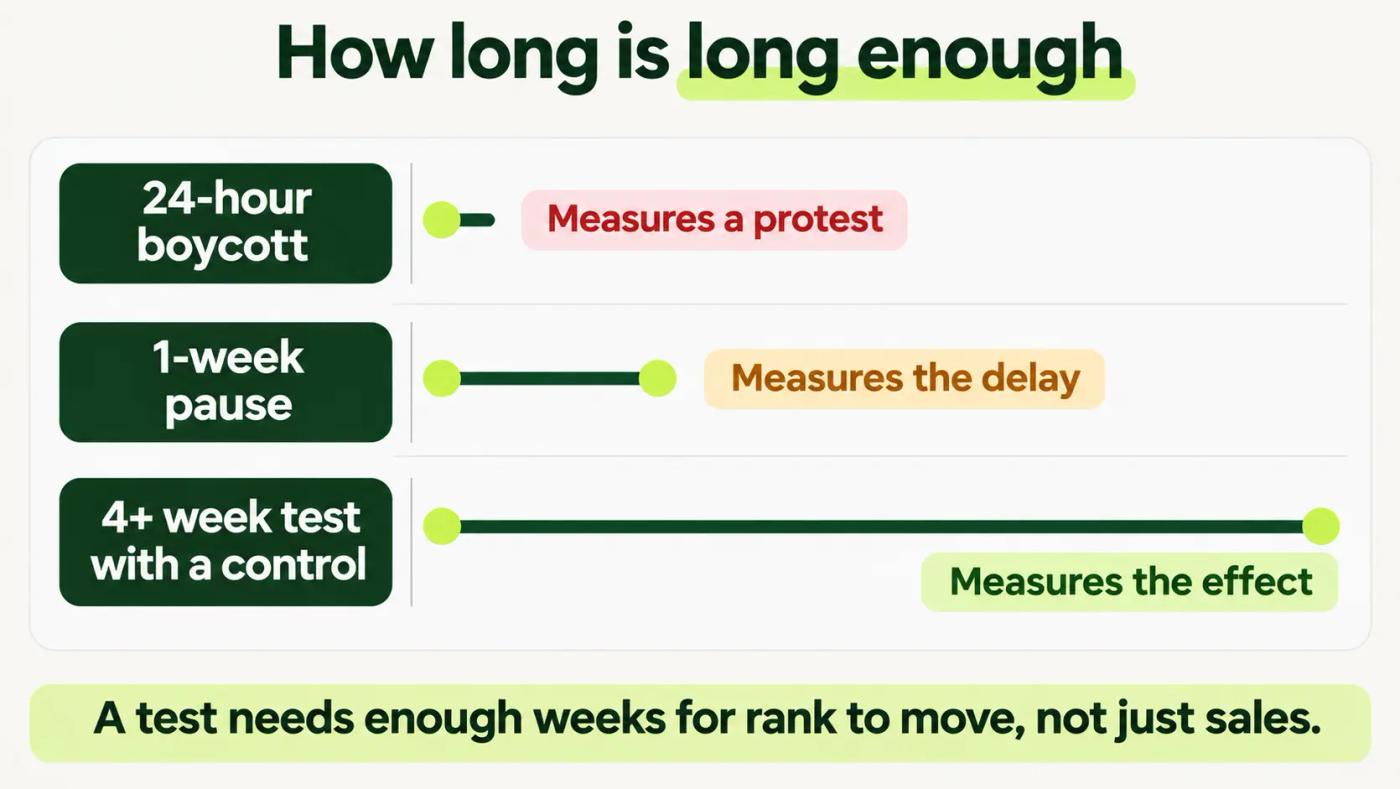
Some large sellers organized a 24-hour ad boycott for April 15, 2026, over a change in how Amazon bills ads. Marketplace Pulse estimated on April 16, 2026 that 1,000 large sellers pausing for a day would cost Amazon roughly $3 million in ad revenue.
That number measures Amazon's loss, not any seller's. A one-day pause can't show what ads do for rank. My working rule: run a pause test for at least four weeks, then keep tracking for two weeks after you restart.
Already paused everything a week ago? Don't celebrate yet, and don't panic. Set an end date four weeks from the day you paused. Use the same weeks last year as a stand-in control, and check rank every week until the end date.
Do this: Put a start date and an end date at least four weeks apart in the calendar before you pause a single campaign.
Pause a slice, and keep a control
A whole-account pause can't tell you what caused what.
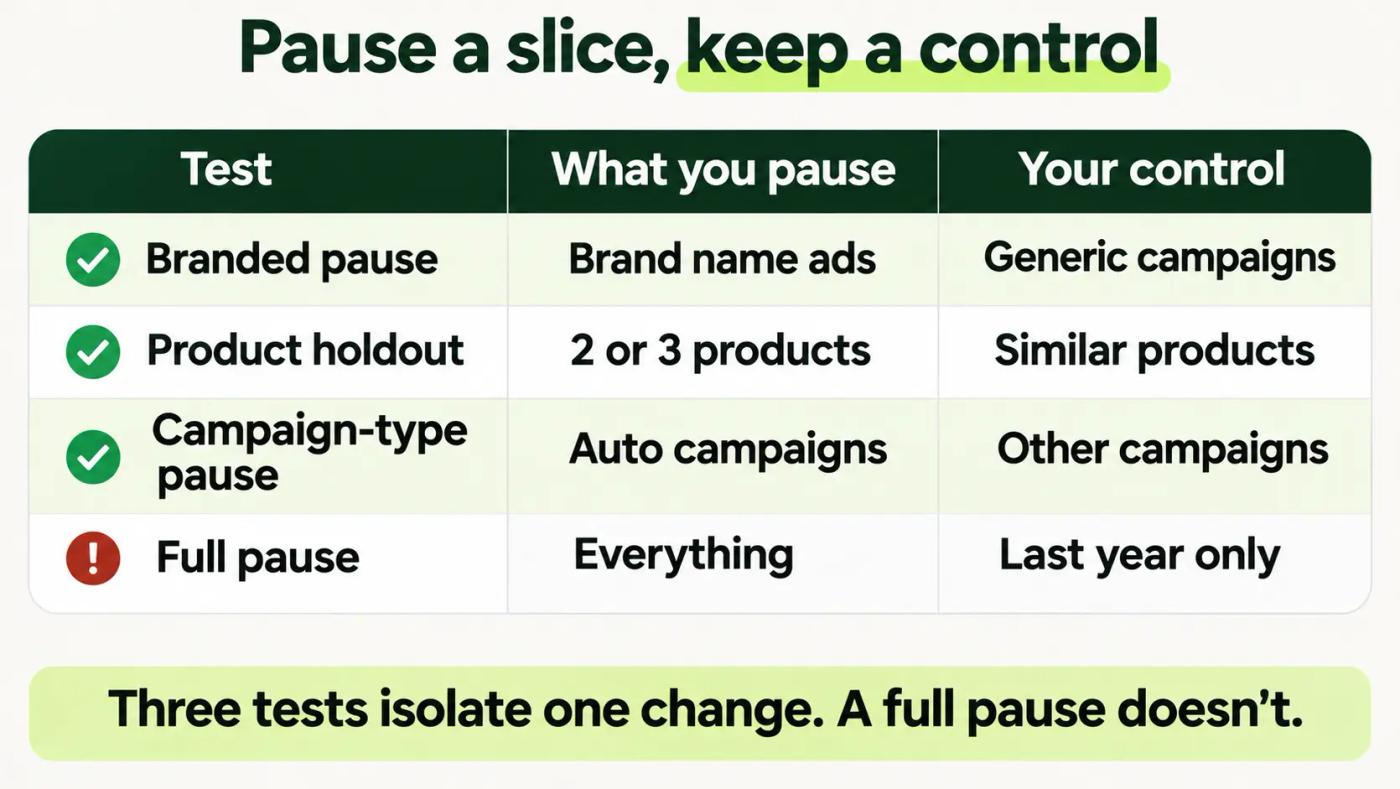
Amazon's dynamic bidding guide puts it plainly. "We recommend that you limit your changes while testing strategies, so that you can attribute the difference in performance to a specific change." A full pause changes everything at once.
| Test | What you pause | Your control | Question it answers |
|---|---|---|---|
| Branded pause | Ads on your own brand name | Generic campaigns, still running | Do brand ads add orders? |
| Product holdout | All ads on 2 or 3 products | Similar products, still advertised | How much do ads add per product? |
| Campaign-type pause | One type, such as auto campaigns | Your other campaigns | Does this type earn its spend? |
| Full pause | Everything | Same weeks last year only | Last resort, weakest read |
Test designs we use. Pick one per test.
Match the control before you start
Pick control products with a similar price, rating and sales level before the test. Keep them in the same category, so the same season and the same rivals hit both groups. Example: pause two $29 products rated 4.4 and 4.5 that each sell about 20 a day, and keep two close matches running. Our baseline guide for the Amazon Ads Agent move uses the same idea: keep a control group of campaigns untouched while one thing changes.
For a product holdout, pause every ad that features the test products. That includes Sponsored Brands and Sponsored Display, not only Sponsored Products. A product still shown in a brand ad isn't really paused.
Branded and generic terms also need separate campaigns, or you can't pause one without the other. That split is part of the campaign structure work in our Amazon PPC management. If they share campaigns today, pause the brand keywords. Then add brand terms as negatives in auto and broad campaigns until the test ends.
Do this: Write down your test slice and your control slice, by product and campaign, before you change a single bid.
Track total sales, rank and share every week
Ad reports can't grade a pause, because the ads are off.
You need numbers that don't depend on ads. Business Reports in Seller Central gives you total sales, sessions and conversion rate. Search Query Performance (SQP) in Brand Analytics shows your brand's share of impressions, clicks and purchases for each search term.
| Weekly column | Where to find it |
|---|---|
| Total ordered sales | Business Reports |
| Sessions and conversion rate | Business Reports |
| Organic position on top 10 terms | Manual search, logged out, same day each week |
| Brand impression and purchase share | SQP, Brand Analytics |
| Total ACoS | Ad spend divided by total sales |
| Rival ads on your brand name | Manual search of your brand terms |
Every column comes from a standard Seller Central report or a manual check.
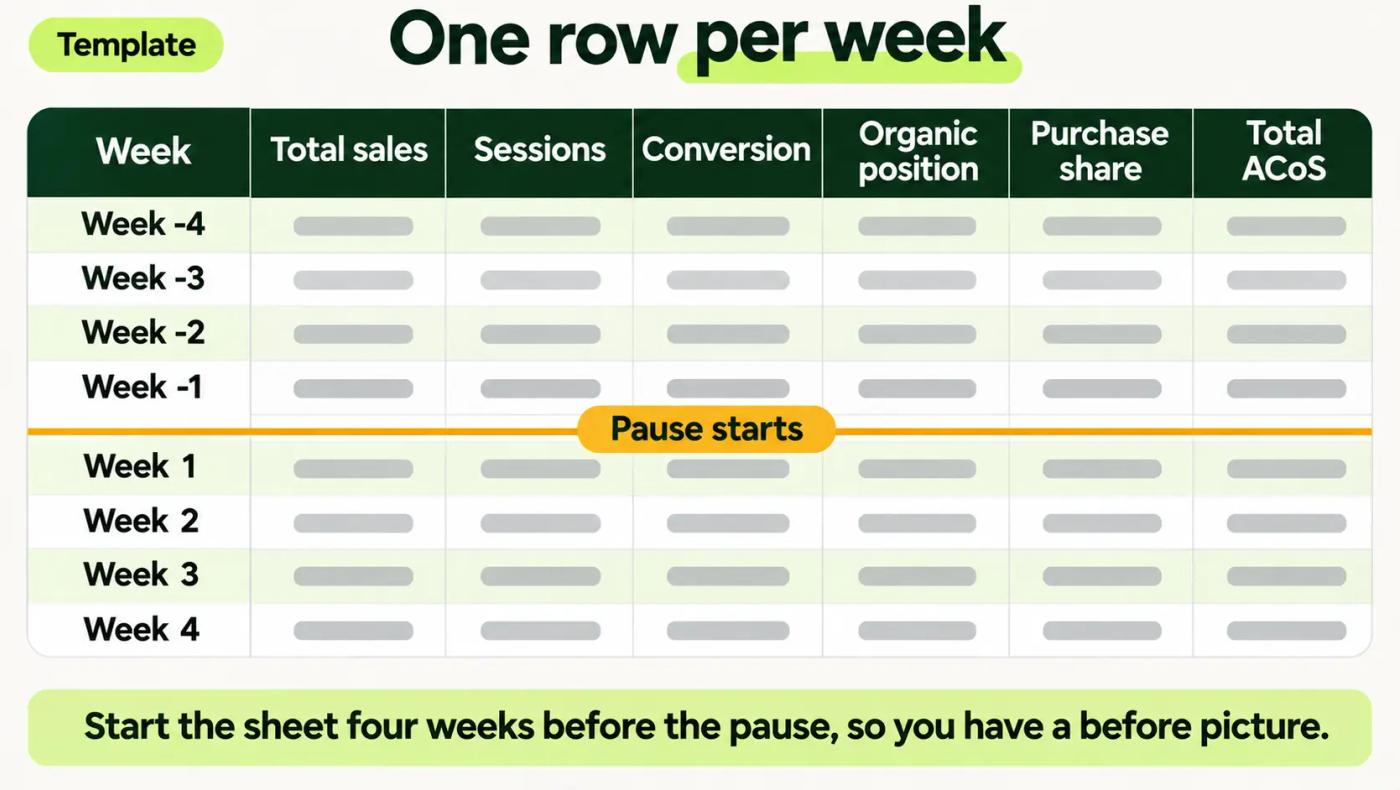
Check organic position the same way every week. Use a private browser window, logged out, on the same day and at the same hour. Count your place among the free results only, and note the page and row.
Total ACoS shows the trade in one number. Example: $6,000 of ad spend on $60,000 of total sales is 10%. If spend falls to $1,000 and sales hold at $58,000, total ACoS drops to about 1.7%. These are example numbers, not client data.
Watch share before sales
Purchase share often moves before total sales do, because it's measured search by search. Our SQP funnel post explains how to read purchase share when it slips at one step.
Rank and sales also feed each other. Our guide for pet brands traces how sales velocity lifts organic rank, which is the loop a pause interrupts.
Do this: Build the sheet with one row per week, starting four weeks before the pause. Fill in the before rows today.
Rule out what can fake a flat result
A flat line can hide a change that rescued you.
Price cuts, coupons, a rival's stockout or a fresh run of reviews can all hold sales up while the ads are off. So can the season. If any of these hit the test products and not the control, the test can't tell you much.
Odd results need the same check. A seller who stopped PPC described the result in a 2022 Seller Forums post. "Items that maybe sold three times a month now are selling by the dozens," they wrote. One reply pointed to attribution. Another guessed that "People see Sponsored and that turns them off." No reply in the thread looked at prices, stock or season.
| Can fake a flat result | How to check it |
|---|---|
| Season | Compare against the same weeks last year |
| Price or coupon change | Log every change on test and control products |
| A rival's stockout | Search your top terms weekly and note who's missing |
| New reviews or rating change | Note the rating at the start and end |
| A sale event | Keep the test away from event weeks |
A short list. Add anything else that changed in your account.
My read: a change on the control side is just as damaging. If the control products got a coupon, a flat test slice may really be a loss.
Do this: Add a notes column to the sheet and log every price, coupon, stock and listing change, on both slices, the day it happens.
Read the result by its shape
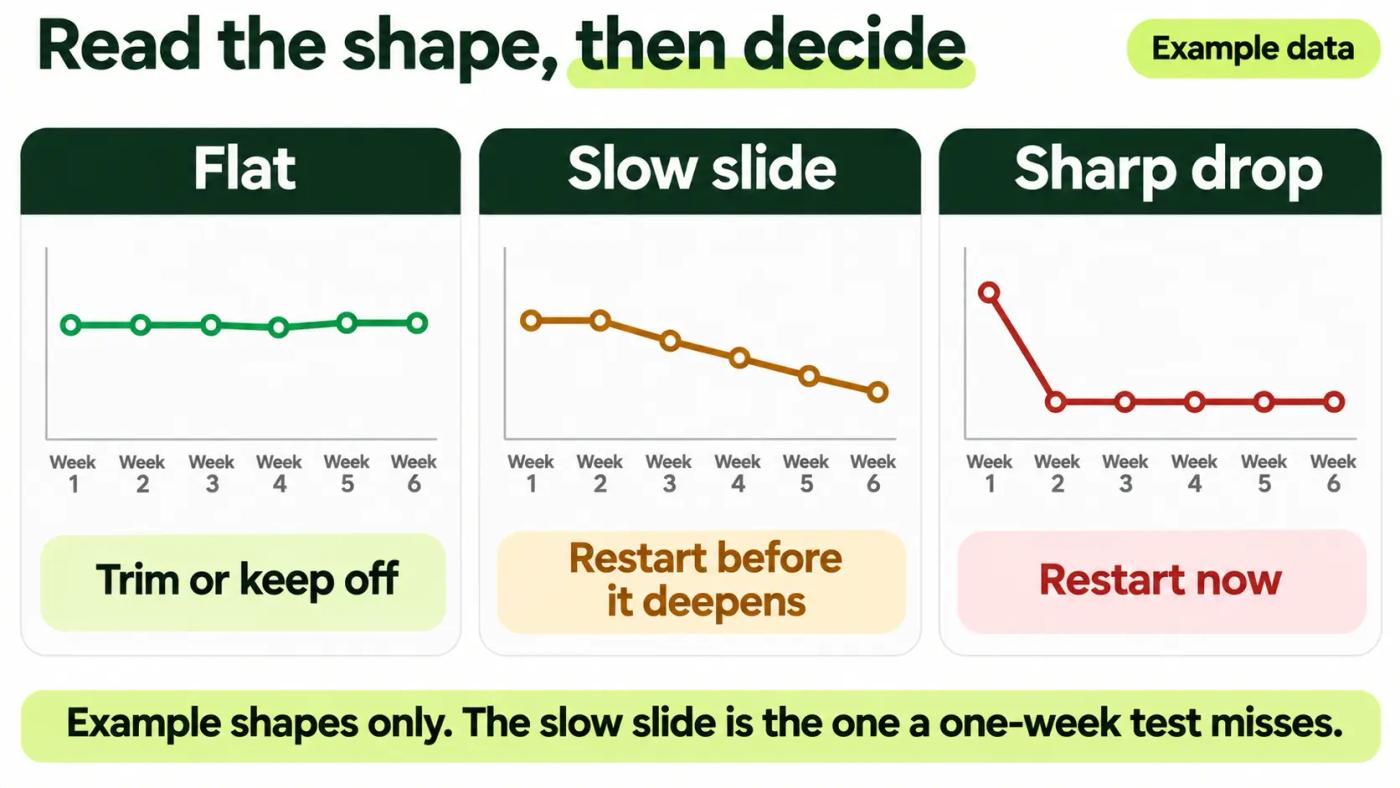
Every pause test ends in one of three shapes. Each one points to a different decision.
| Shape | Weeks 1 to 2 | Weeks 3 to 6 | What it means | Decision |
|---|---|---|---|---|
| Flat | Sales hold | Sales and rank hold | Ads mostly bought clicks you'd get anyway | Keep the slice off or trim it |
| Slow slide | Sales hold | Rank slips, sales follow | Ads were holding your rank | Restart before the slide deepens |
| Sharp drop | Sales fall | Stay down | Ads were creating demand | Restart now |
Example shapes, not client data.
That reply also gave the rule: "your break-even read is the flat line after pausing, not the rank you started with." Judge the test on where things settle, not on the first week.
My working rule: call it a slide when your position falls on three or more of your top 10 terms for two straight weeks. Don't wait for the sales column to confirm it.
A flat result still needs a second look. Re-check at week eight before you move that budget for good, because a slow slide can start late.
Brand terms need their own read
A flat branded pause is a common result, and the riskiest one to act on. If the brand test comes back flat, read how incrementality shows up in SQP before you cut brand defense for good. Then search your brand name and see whose ads now sit above your listing.
Do this: Label your result as flat, slow slide or sharp drop, in writing, before anyone decides what to do next.
Restart on purpose, not in a panic
The restart is part of the test, so plan it before you pause.
The same forum reply suggested "a defensive middle ground" of "roughly 20 to 30 percent of your prior budget on highest-intent terms only." An Amazon community manager in the thread suggested a "reduced budget targeting only your most profitable keywords to protect market share from competitors."
Example: if the paused slice spent $10,000 a month, a defensive restart is $2,000 to $3,000 a month on your highest-intent terms. These are example numbers, not client data.
My read: a full restart after a slow slide is rarely needed. Start with the terms where rank slipped first. Then add back in steps of two weeks, and keep the control running so you can compare. After a restart, give rank the same four weeks to recover before you judge the restart itself.
Mixed result? Walk through the weekly sheet in a free strategy session before you commit to a restart budget.
Do this: Write the restart rule before the test starts: which result triggers a restart, at what budget, and on which terms.
What you can't fix
You can't see how Amazon ranks products. Amazon doesn't publish its organic ranking formula, so every test reads the outcome, not the mechanism.
You can't control rivals. If a competitor launches a deal or raises bids during your test, your result moves for reasons that have nothing to do with your ads.
You can't make one account represent a market. The forum seller had six new products in one category. Your catalog, prices and rivals will behave differently.
And one limit on our side: we haven't published a client pause test yet. This post uses seller threads, Amazon's guide and two published studies.
Your pause test checklist
- Organic position on your top 10 terms recorded for the week before
- One test slice and one matched control written down
- Every ad featuring the test products paused, across ad types
- Start and end dates at least four weeks apart, away from sale events
- Weekly sheet built, with four weeks of before rows and a notes column
- Rival ads on your brand terms checked each week
- Result labeled as flat, slow slide or sharp drop
- Restart rule and restart budget set before the pause
Where we fit
Our work is Amazon PPC for brands past $10K a month in ad spend. Our fee is flat, so recommending a pause that saves you money costs us nothing.
Want to know which slice is safe to test first? Our free audit finds the wasted spend worth pausing and sends a prioritized action list within 24 hours. No pitch.
If you spend under $10K a month, the checklist above is enough to run on your own.
Authoritative resources
- Seller Forums pause threadA seller's pause, the one-week warning, and an Amazon reply.
- Sellers Ask Sellers organic threadSellers on ads taking credit for organic sales.
- Attributed, But Not IncrementalJune 2026 paper on attributed versus incremental conversions.
- Sponsored is the New Organic study4,800 simulated Amazon searches across four marketplaces.
- Marketplace Pulse on the boycottThe April 2026 ad boycott and its scale.
- Amazon Ads dynamic bidding guideLimit changes while testing.
- Seller Forums stopped-PPC threadA 2022 seller's sales after stopping PPC.