In this guide
- Save the baseline in five steps
- The console you know has an end date
- Save 15 months of account totals
- Freeze results by campaign and product
- Save placements, search terms, and click prices
- Snapshot every setting before anything changes
- Rebuild scheduled reports before December 31, 2026
- Change one thing at a time once you move
- What you can't fix
- Your baseline checklist
- Where we fit
- Authoritative resources
- Frequently asked questions
Key takeaways
What to save before Amazon's new platform and new report pages change your account, and how to test new tools against it.
- Amazon announced Amazon Ads Agent on September 29, 2026, as the platform that replaces the Ads Console.
- Amazon is retiring its Sponsored Ads and Amazon demand-side platform (DSP) report pages by December 31, 2026.
- Unified reporting keeps up to 15 months of daily or weekly data, and up to 6 years of monthly data.
- Scheduled reports stop running after December 31, 2026 unless they are recreated in unified reporting.
- The conversational agent itself was still in closed beta in 25 countries in late October 2026.
You can't tell what Amazon Ads Agent changed if you never wrote down where you started. You can write it down this week.
Amazon retires its Sponsored Ads report pages by December 31, 2026. Any scheduled report you haven't rebuilt stops with them.
What should you save before Amazon Ads Agent changes your account? Save five baselines: 15 months of account totals, campaign and product results, placements and search terms, every setting, and your scheduled reports. Finish before December 31, 2026, when the old report pages retire. Then change one thing at a time.
Save the baseline in five steps
- Export 15 months of monthly totals from Business Reports and the Ads Console.
- Export 90 days of daily campaign and product results.
- Save placement, search term, and click price data for the same 90 days.
- Download a bulk file with every campaign's settings.
- List every scheduled report and rebuild it in unified reporting.
Every number in this baseline answers one question: what did each ad dollar bring back? That is return on ad spend (ROAS), one of the core metrics our pay-per-click (PPC) guide walks through.
The console you know has an end date
Three changes overlap: a new platform, new report pages, and new campaign types. Each one moves the ground under your numbers.
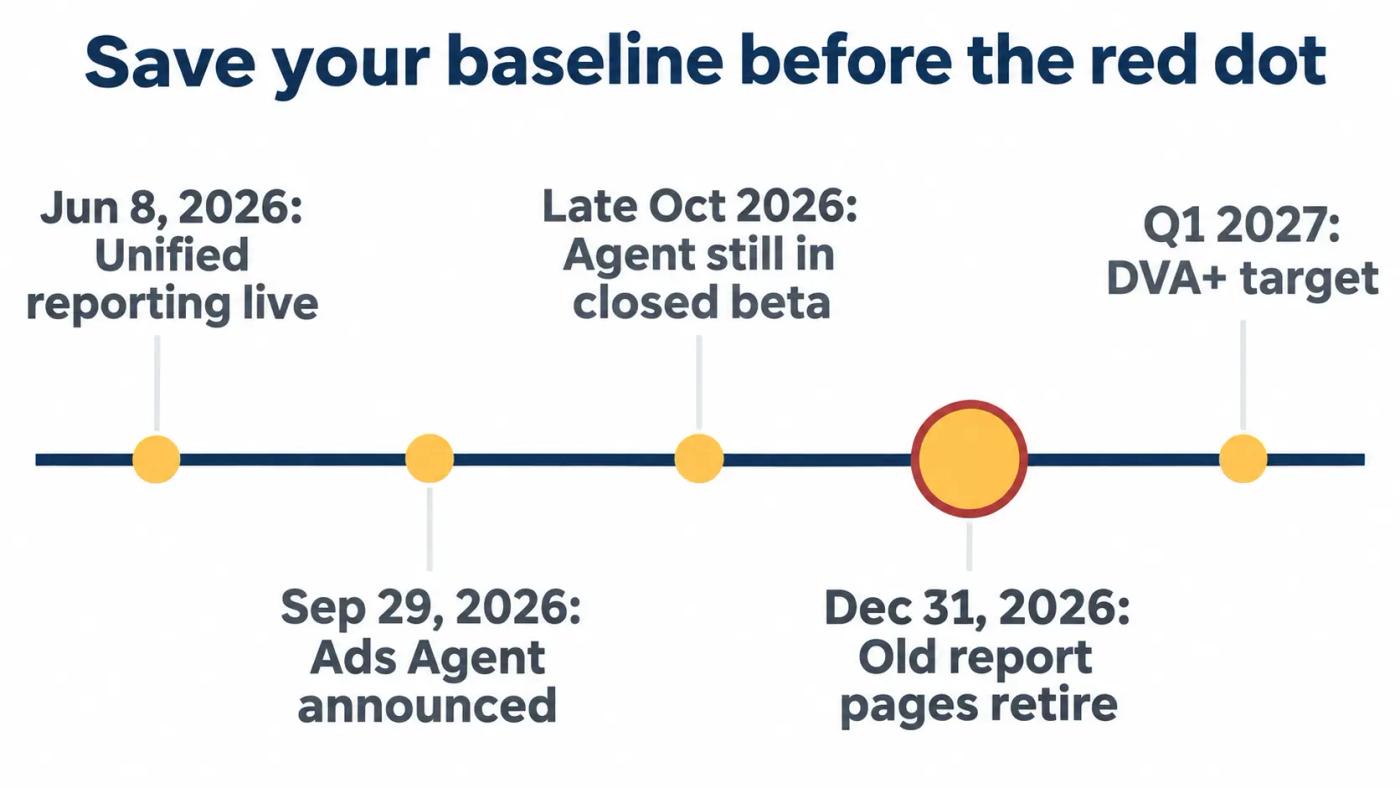
| Date | What happened or is planned | Source |
|---|---|---|
| June 8, 2026 | Unified reporting reached general availability in the Ads Console | Amazon Ads |
| September 29, 2026 | Amazon Ads Agent announced as the platform that replaces the Ads Console | Adweek, Amazon Ads |
| Late October 2026 | The conversational agent still in closed beta, in 25 countries | PPC Land |
| December 31, 2026 | Sponsored Ads and Amazon DSP report pages retired | Amazon Ads |
| First quarter of 2027 | DVA+ general availability target, in 35 markets | PPC Land |
Dates as announced or reported. Checked November 11, 2026.
Adweek reported on September 29, 2026 that "The new platform is called Amazon Ads Agent and replaces Amazon Ad Console." Kelly MacLean of Amazon Ads told Adweek the change "isn't simply a rebrand."
Amazon's unBoxed 2026 recap calls it "the unified buying experience that brings together what was formerly the DSP and Ads Console." It also promises "nearly 1,000 metrics at your fingertips through natural language."
PPC Land put the gap in one line on October 29, 2026. In its words, "everyone has the platform called Ads Agent, and only some have the thing it is named after."
My read: the name changed first, and the agent arrives later. That gap is your window to save the baseline.
What the agent will be able to do
Amazon's unBoxed recap quotes Paul Kotas: "You can ask questions, gain insights, consider detailed recommendations, or simply give instructions." PPC Land reported the conversational agent is "in closed beta for eligible self-service and managed-service advertisers, in 25 countries."
We found no Amazon statement on whether it asks before it acts. An assistant that takes instructions can make many changes in one sitting, so the baseline is how you'll judge them.
Plans slip, too. An open beta for DVA+ had been expected in late October. On October 29, 2026, PPC Land noted that Amazon's launch page still called it a closed beta in the US.
Do this: Put December 31, 2026 in your calendar as the last day to finish the export. Aim to finish well before peak season.
Save 15 months of account totals
Start with the numbers that don't depend on any one campaign.
Amazon says unified reporting gives you "Access up to 15 months of daily or weekly data." Beyond that, it keeps up to 6 years of monthly, yearly, or summary data. Fifteen months covers the same month last year, plus everything since.
Total advertising cost of sales (TACoS) is ad spend divided by total sales. Advertising cost of sales (ACoS) is ad spend divided by ad sales. Keep both, because a new platform can move one without the other.
| Month (example row) | Total sales | Ad spend | Ad sales | TACoS | ACoS |
|---|---|---|---|---|---|
| October 2026 | $210,000 | $25,200 | $72,000 | 12.0% | 35.0% |
Example row, not client data. Total sales come from Business Reports in Seller Central.
Take ad spend from every ad type: Sponsored Products, Sponsored Brands, and Sponsored Display. A baseline that covers one ad type will make any later shift look bigger or smaller than it was.
Our own weekly reporting for managed accounts is built on TACoS and market share. Both read the whole account, not one campaign.
Mark the months that weren't normal
Add a notes column. Write down every Prime event, stockout, price change, and product launch in the 15 months. A baseline month with a stockout will make any later month look like a win, unless the note sits beside it.
For a full year-on-year view, add monthly totals back to 24 months. Unified reporting keeps monthly data for up to 6 years, so the older rows are still there to export.
Example: if TACoS was 10.5% in October 2025 and 12.0% in October 2026, the account was already paying more per sale before any move. A later rise has to be judged against 12.0%, not the older number.
Do this: Build one sheet with 15 rows, one per month, and fill in the five columns above.
Freeze results by campaign and product
A campaign that changes name or type in the new platform is hard to match later. Save it the way it looks today.
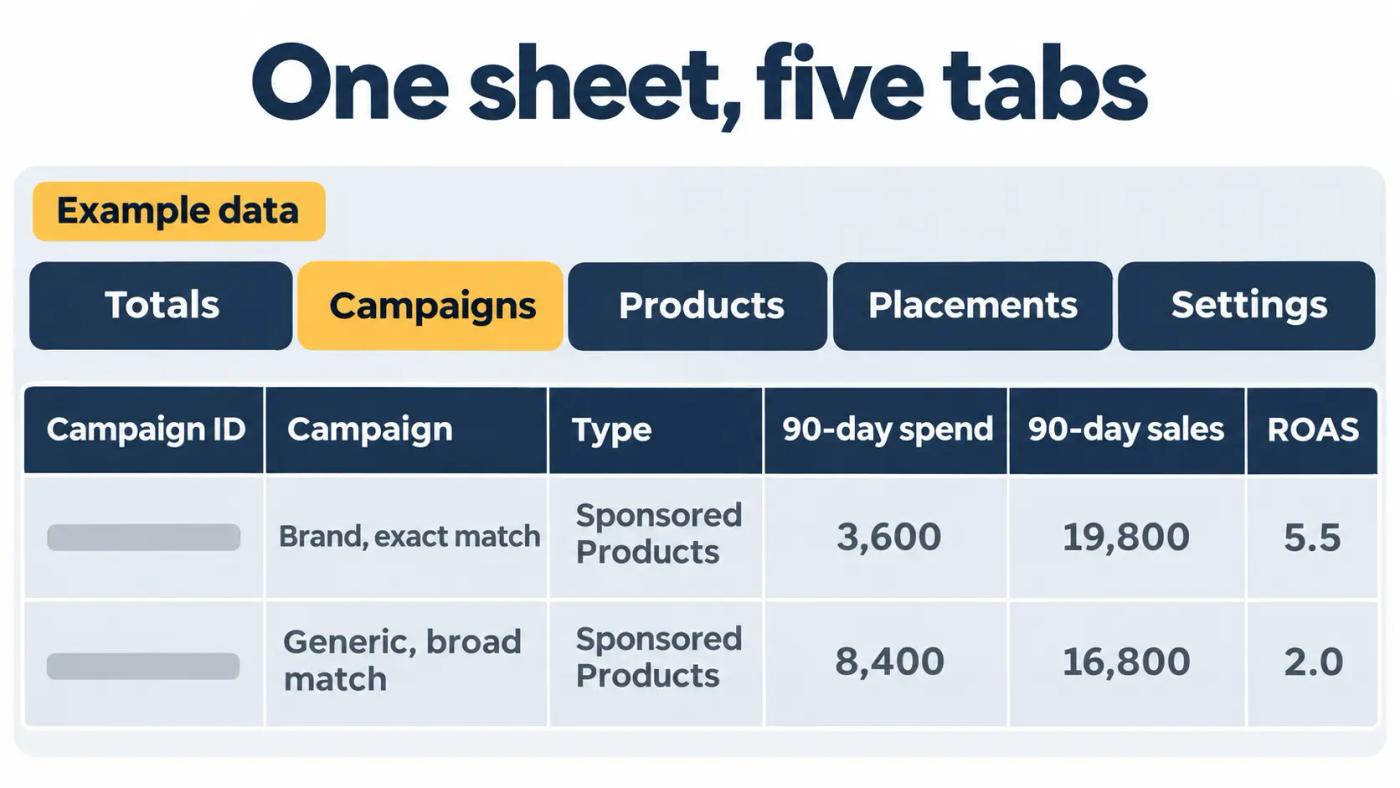
Export the campaign report with daily rows for the last 90 days. Keep each campaign's ID next to its name, so you can still match rows if a name changes. Then export the advertised product report, so you can see spend and sales for each Amazon Standard Identification Number (ASIN).
| Campaign (example) | Type | 90-day spend | 90-day sales | ROAS |
|---|---|---|---|---|
| Brand, exact match | Sponsored Products | $3,600 | $19,800 | 5.5 |
| Generic, broad match | Sponsored Products | $8,400 | $16,800 | 2.0 |
Example rows, not client data. ROAS = sales ÷ spend.
Find the products that carry the account
Sort the advertised product report by spend, and mark the products that take most of the budget. A new campaign type that shifts spend between them can change results more than any bid.
Timing belongs in the baseline too. If you use Amazon Marketing Stream, save hourly spend and sales for the same 90 days. Our 2026 roundup explains how Amazon Marketing Stream adds hourly signals, the data you'd need to judge any change to dayparting.
Do this: Export 90 days of the campaign and advertised product reports today. Keep the raw files, not only your summary sheet.
Save placements, search terms, and click prices
New automated campaign types pick their own targeting, inventory, and bids, as PPC Land described for DVA+. Save how yours look before they do.
| Placement (example) | Spend | Sales | ACoS |
|---|---|---|---|
| Top of search | $9,000 | $30,000 | 30.0% |
| Rest of search | $4,500 | $9,000 | 50.0% |
| Product pages | $3,000 | $7,500 | 40.0% |
| Off Amazon | $600 | $300 | 200.0% |
Example rows for one 90-day window, not client data.
Pull the placement report for the same 90 days. Then save the search term report, sorted by spend, with orders and ACoS for each term. Those two files show where your money lands before any new tool starts moving it.
Click prices move with the market, not only with your bids. Note the cost per click (CPC) on your top terms. If you use Brand Analytics, note the median click price for the same terms in your Search Query Performance (SQP) report. A later rise can then be read against the category.
Tag brand and non-brand terms
Add one column to the search term file: brand or non-brand. A shopper who searches your brand name was already looking for you. If a new campaign type shifts spend toward those searches, ROAS can rise without new customers, which our guide to incrementality explains in detail.
Do this: Save the placement and search term reports for 90 days. Mark your top 20 search terms by spend and their CPC.
Snapshot every setting before anything changes
Results without settings can't be explained later.
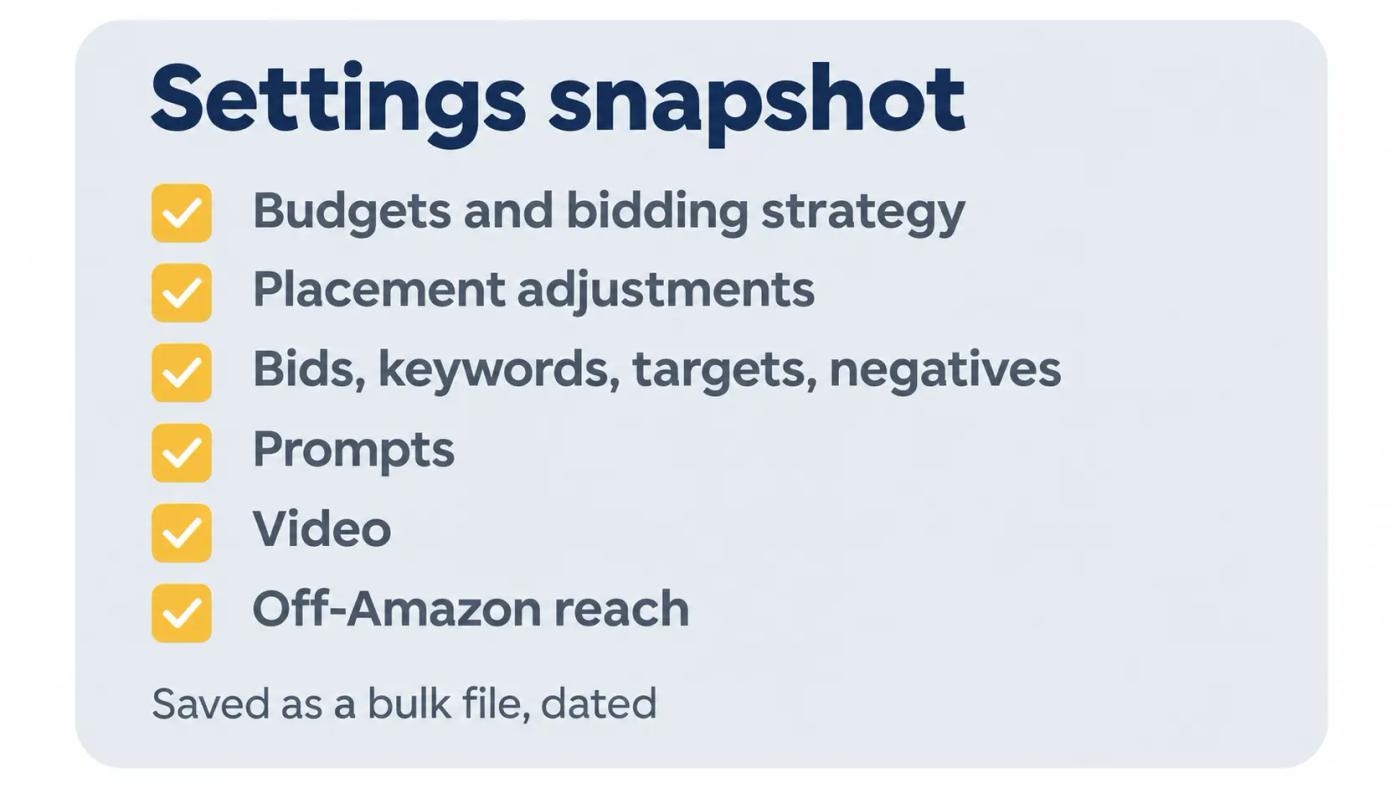
Download a bulk file for every campaign. It records what you chose: budgets, bids, bidding strategies, placement adjustments, keywords, targets, and negatives. That file is your answer when someone asks what was switched on, and when.
| Setting | Where to check it |
|---|---|
| Budgets and bidding strategy | Campaign settings |
| Placement adjustments | Campaign settings |
| Bids, keywords, targets, negatives | Ad groups |
| Prompts | Prompts tab in each ad group's ads |
| Video | Video tab in each ad group |
| Off-Amazon reach | Campaign settings |
Prompts and video tab locations as described by PPC Land and an Amazon forum moderator in 2026.
Write down what Amazon turned on for you
Some of these settings changed in 2026 without anyone clicking. PPC Land reported in March 2026 that Sponsored Products and Sponsored Brands campaigns are enrolled in prompts automatically. It also reported creator placements turned on by default from August 10, 2026. Your snapshot should show which of these were on, with an "on" or "off" column for each campaign.
Include Sponsored Brands and Sponsored Display in the same download, not only Sponsored Products. Then save a fresh bulk file the day before any planned change, so each change has its own before picture.
Do this: Download a bulk file for all campaigns today. Name it with the date, and start a change log in the same folder.
Rebuild scheduled reports before December 31, 2026
A scheduled report you haven't rebuilt will stop.
In its June 8, 2026 launch notice, Amazon wrote that "we're sunsetting Sponsored Ads reports," with a date of December 31, 2026. It added: "An automated subscription migration tool will be available soon to help you transition your existing scheduled reports." We found no launch notice for that tool as of November 9, 2026.
PPC Land's June 10, 2026 report spells out the consequence. Scheduled reports "will stop running after December 31, 2026 unless they have been recreated inside the new system." It advised advertisers to "verify that migrated reports produce equivalent output rather than assuming a direct translation."
Run old and new side by side
Pick one date range. Run the old report and its unified version for the same dates. Compare total spend, sales, and orders. PPC Land flagged reports with custom date ranges, non-standard metric combinations, or account filters as the ones to verify, so check those first. If the totals differ, check the attribution window each report uses before you trust either one.
Platform moves are rarely smooth. On September 1, 2026, a seller on Sellers Ask Sellers wrote that the Ads Billing Console "was totally inoperative for the entire month of August." Another posted the error "Could not load products at this time. Try again later." Save your files while the old pages still load.
Before the cutoff, also download the last output of each old scheduled report. If the rebuilt version ever disagrees, you'll still have the original to check against.
Do this: List every scheduled report you rely on. Rebuild each one in unified reporting, then compare one week of output against the old version.
Change one thing at a time once you move
The baseline only helps if you can trace each change against it.
One seller set out the habit in a Seller Forums thread in August 2026: "I also keep a change log." The same post explained why: "Making too many changes at once makes it almost impossible to understand what actually worked."
Test each new tool against the baseline
My working rule: one change per group of campaigns, then four weeks before the next. Keep a few campaigns untouched as a control group. Compare four weeks after the change with the four weeks before, and with the same weeks last year from your 15-month sheet.
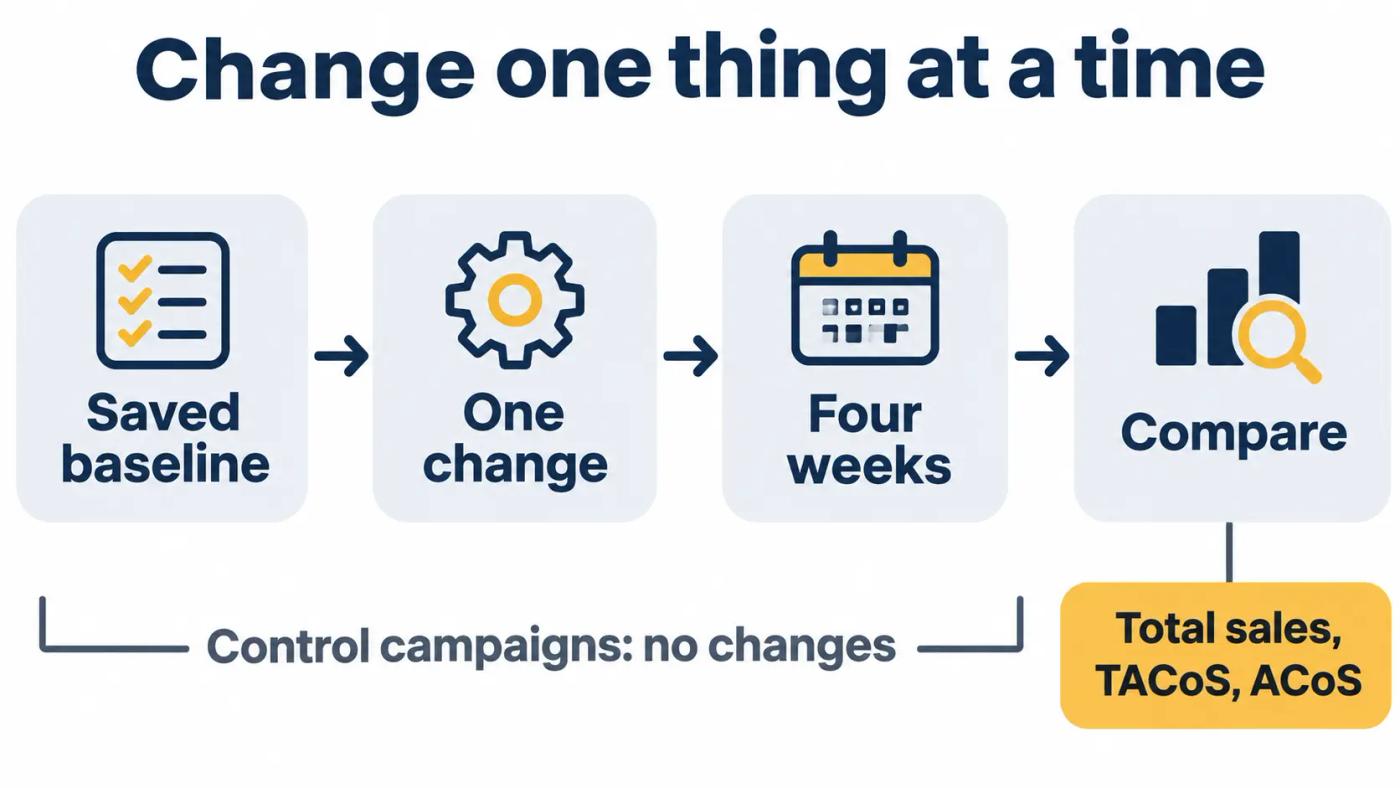
If a change lifts ACoS but total sales and TACoS hold or improve, it may still be worth keeping. If ACoS looks better while total sales fall, the change moved credit, not orders.
Judge new campaign types on the same numbers
New campaign types arrive with their own dashboards. MediaPost reported on September 29, 2026 that Full-Funnel Campaigns carry a minimum daily budget of $100. DVA+ is targeted for general availability in the first quarter of 2027. Whatever the type, test it on products from your baseline, with a fixed budget, and judge it on total sales and TACoS.
Log the agent's suggestions too. Write down each recommendation, whether you accepted it, and the date, so its results can be judged like any other change.
Put the comparison on a fixed day each week. Our SQP review routine already sets one aside, so the check rides on a habit you have.
If you want a second read on the plan, bring your baseline sheet to a 30-minute strategy session with a senior strategist.
Do this: Write your first planned change in the change log now, with the date you'll make it and the date you'll judge it.
What you can't fix
You can't see how Amazon will move existing campaigns into the new platform. PPC Land noted on October 29, 2026 that Amazon's pages don't explain how migration works.
You can't pull daily data older than 15 months from unified reporting. Whatever you need beyond that, save now.
You can't choose when the conversational agent reaches your account.
You can't expect old and new reports to match line for line. Definitions can change, which is why you run both on the same dates.
And one limit on our side: we haven't yet published a client account's results before and after the move. This post uses Amazon's announcements and trade press reporting.
Your baseline checklist
- 15 months of monthly totals: total sales, ad spend, ad sales, TACoS, ACoS
- 90 days of daily campaign results, with campaign IDs
- 90 days of advertised product results by ASIN
- Placement and search term reports for the same 90 days
- CPC for your top 20 search terms
- A dated bulk file with every campaign's settings
- A list of every scheduled report, rebuilt in unified reporting
- One week of old and new reports compared side by side
- A change log with your first planned change and its review date
Where we fit
We're Amplivus. We manage Amazon ads for brands spending $10K or more a month. Our pricing is a flat monthly fee, so your baseline numbers never set our pay.
Want someone to check your baseline before the old pages retire? A free Amazon PPC audit gives you a written diagnosis with a prioritized action list within 24 hours. No pitch.
If you spend under $10K a month on ads, the checklist above is enough to run on your own.
Authoritative resources
- Seller Forums change log threadOne seller's case for logging every change.
- Adweek on Amazon Ads AgentThe platform that replaces the Ads Console.
- Amazon unBoxed 2026 recapAmazon's description of Amazon Ads Agent.
- PPC Land on the closed betaWhat the platform has now and what is still in beta.
- Amazon unified reporting noticeThe December 31, 2026 retirement and the 15-month window.
- PPC Land on unified reportingWhat happens to scheduled reports.
- Sellers Ask Sellers console threadSellers on console outages in August 2026.