In this guide
- Decide in five steps
- Amazon is folding Sponsored Display into DVA+
- The rollout is a beta, not a deadline
- Split your Sponsored Display spend by the job it does
- Grade each job on its own numbers
- Cap the test budget before you start
- Test DVA+ with one objective and one product set
- Save your Sponsored Display history now
- What you can't fix
- Your Sponsored Display checklist
- Where we fit
- Authoritative resources
- Frequently asked questions
Key takeaways
What Amazon's DVA+ launch means for your Sponsored Display budget, and a plain way to decide what to keep, cut, or test.
- DVA+ buys display, video, streaming TV, and audio ads in one campaign, with one objective and one budget.
- Digiday reports that DVA+ brings Sponsored Display, Sponsored TV, and programmatic buying together.
- DVA+ runs inside Amazon Ads Agent, which replaces the old Ads Console and Amazon demand-side platform (DSP) experience.
- DVA+ began as a US invite-only closed beta, with general availability targeted for early 2027.
- We found no public date for when existing Sponsored Display campaigns stop or move.
On September 29, 2026, Amazon Ads announced DVA+. It is one campaign type for display, video, and audio (DVA) ads, built into the new Amazon Ads Agent.
Sponsored Display is folding into it. If you spend real money on display today, the question is what to do with that budget now.
Should you keep, cut, or test Sponsored Display as it moves into DVA+? Keep each Sponsored Display job that pays on its own numbers. Cut the jobs that don't. Test DVA+ with one objective and a capped budget before you move more spend. We found no public shutdown date for existing campaigns, so you have time to measure first.
Decide in five steps
- Export 90 days of Sponsored Display reports this week.
- Split the spend by job: product pages, views remarketing, purchases remarketing, and audiences.
- Grade each job on return on ad spend (ROAS), new-to-brand orders, and total advertising cost of sales (TACoS).
- Keep the jobs that pass. Cut the ones that don't.
- Test DVA+ with one objective and a capped monthly budget.
Our pay-per-click (PPC) guide calls Sponsored Display the reach-and-retarget tool, and that is the right frame here. The real question is which reach and which retargeting earn their keep.
Amazon is folding Sponsored Display into DVA+
Sponsored Display is no longer a standalone product in Amazon's plan.
Amazon's unBoxed 2026 recap says "DVA+ brings the power of programmatic advertising to all advertisers in a single buying experience inside Amazon Ads Agent." It promises "One objective, one budget, one campaign across all media types."
Digiday reported on announcement day that DVA+ "consolidates Sponsored Display, Sponsored TV and programmatic display, video and audio buying."
MediaPost added that Amazon Ads Agent "replaces the former Ads Console and Amazon DSP experience." It quoted Kelly MacLean of Amazon Ads: "With DVA+, we have brought the power of programmatic to advertisers of all sizes."
New to programmatic buying? Our ad types guide explains how Amazon DSP differs from the self-service ads most sellers start with.
| Sponsored Display today | DVA+ as announced | |
|---|---|---|
| Inventory | Display ads on and off Amazon | Display, video, streaming TV, and audio |
| Setup | You choose targets and bids | You pick an objective, products, creative, and budget |
| Bidding | Your bids, paid per click or per thousand viewable impressions | Automated by default; manual bid strategies in advanced settings |
| Optimization | Your targets and bid changes | Brand+ or Performance+, picked from your objective |
My read: this is bigger than a rename. Your old Sponsored Display numbers won't map one to one onto a campaign that picks its own inventory and bids.
What DVA+ adds that Sponsored Display didn't
PPC Land reported that advertisers pick an objective: "sales, traffic, awareness, leads and others." Two engines sit behind those objectives. Brand+ aims at awareness and reach, while Performance+ aims at consideration and conversion. DVA+ picks the engine from the objective you choose.
Amazon's recap describes a second tier: "For those that want full control, advanced settings put every programmatic lever at their fingertips."
MediaPost reported MacLean saying brands can go from setup to campaign within minutes. My read: setup speed is not the test. A campaign you can launch in minutes still has to beat the Sponsored Display job it replaces.
Do this: Read Amazon's unBoxed 2026 recap and list what it does not say: dates, billing, and what happens to your current campaigns.
The rollout is a beta, not a deadline
Nothing forces you to move Sponsored Display money this month.
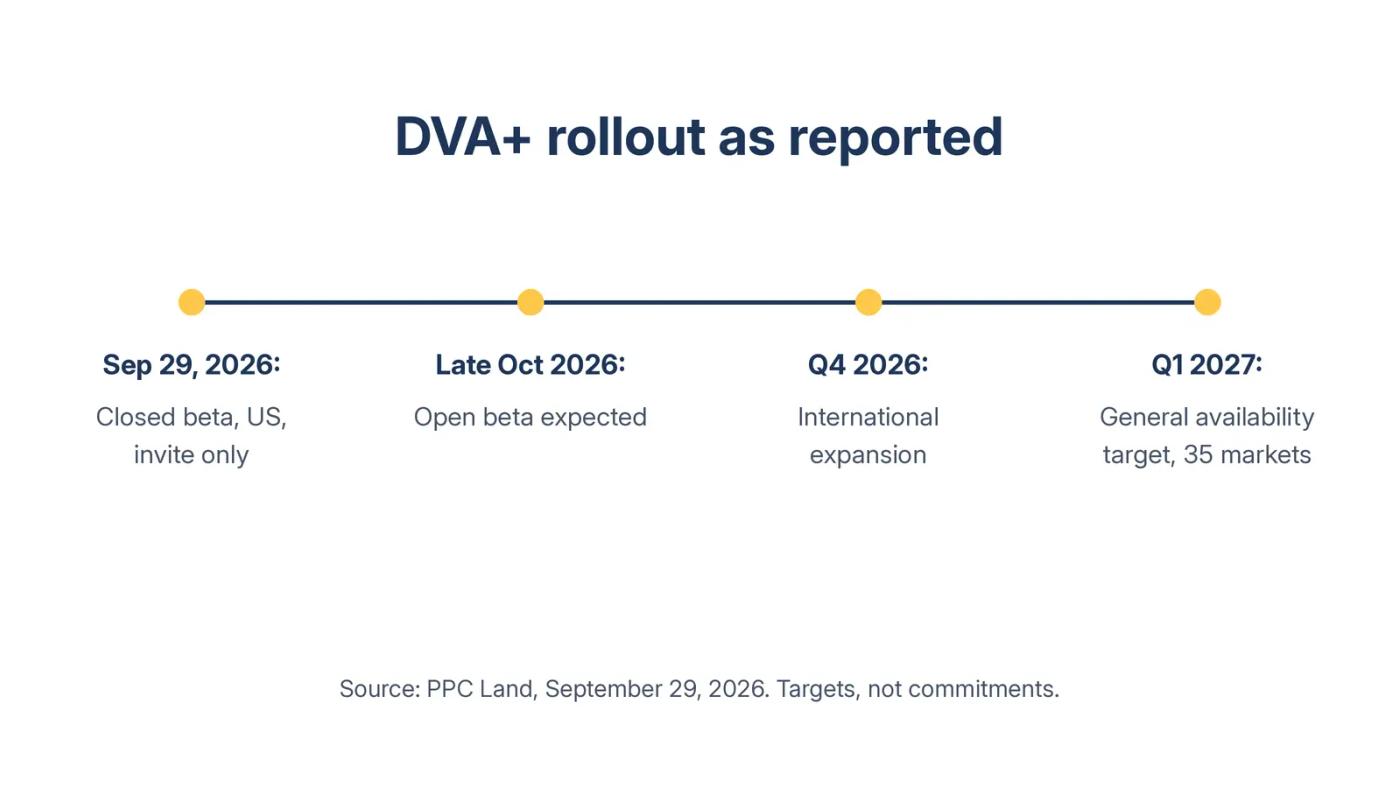
PPC Land's September 29, 2026 report says DVA+ was in an extended closed beta, in the US only, by invitation.
| Stage | Timing reported | Notes |
|---|---|---|
| Closed beta | From September 29, 2026 | US only, by invitation |
| Open beta | Expected late October 2026 | Region not stated |
| International expansion | Through the fourth quarter of 2026 | Markets not named |
| General availability | Targeted for the first quarter of 2027 | 35 markets |
Who gets which version
The same report says sellers, vendors, and off-Amazon brands with an Amazon Ads Agent account are eligible. Payment was invoice-only during the closed beta, with credit card support planned for the first quarter of 2027.
PPC Land says access to the controls depends on your history. Advertisers with programmatic experience get both DVA+ and advanced settings. New advertisers and Sponsored Ads advertisers get DVA+, and can request advanced settings through an Amazon Ads account manager. Agencies with existing entity access get both.
My read: a brand that buys only Sponsored Display today will likely start in the simplified version. If you want manual control over bids, ask for advanced settings early.
What Amazon hasn't said yet
We found no public date for when existing Sponsored Display campaigns stop, move, or change.
Fees are unknown too. For advanced settings, PPC Land lists "Manual bid strategies, format-level CPM management," where CPM means cost per thousand impressions. But it says Amazon's document "is equally silent on fees and minimum spend."
Minimums have a history. PPC Land noted that when Campaign Manager brought sponsored ads and Amazon DSP together in November 2025, the DSP kept its existing minimum spend rules. Whether DVA+ campaigns carry one is not stated.
My read: until Amazon gives a migration date, your current campaigns keep earning or losing on their own merits.
Do this: Ask your Amazon account contact, in writing, when your Sponsored Display campaigns move, how DVA+ bills, and whether a minimum applies.
Split your Sponsored Display spend by the job it does
"Sponsored Display" is four different jobs sharing one name.
Amazon's display ads guide lists the targeting options. They are contextual targeting of "specific products, or relevant product categories," Amazon audiences, views remarketing, and purchases remarketing. Billing is by cost per click (CPC) or cost per thousand viewable impressions (vCPM).
| Job | Targeting | What it should earn |
|---|---|---|
| Defend and attack product pages | Contextual: products and categories | Orders at your target ROAS |
| Bring back viewers | Views remarketing | Orders from shoppers who viewed |
| Bring back buyers | Purchases remarketing | Repeat orders |
| Find new shoppers | Amazon audiences | New-to-brand orders |
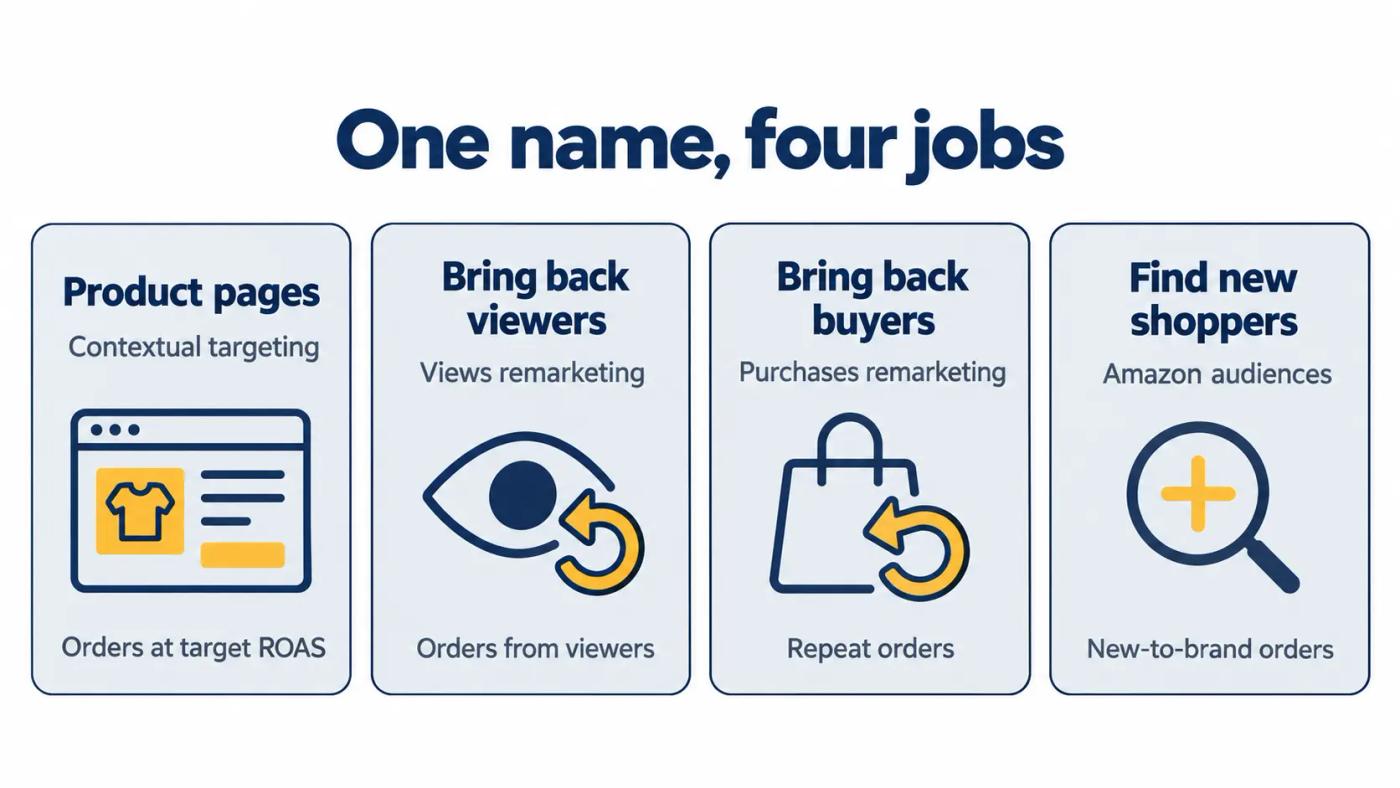
If your Sponsored Display campaigns mix two or more jobs, split them before you judge anything. A blended campaign hides which job pays.
The same Amazon guide lists four downloadable reports: Purchased product, Targeting, Advertised product, and Campaign. The Targeting report is the one that lets you sort spend into jobs.
Brands that also buy Amazon DSP should check overlap. Our skincare playbook notes that much on-Amazon retargeting can also run through Sponsored Display audiences.
Two leaks to check before you grade
Our display service page lists two leaks we check before any verdict.
The first is timing: "Every product runs the same lookback window, so budget chases shoppers who moved on weeks ago." My read: a product people rebuy monthly and one they buy once a year need different windows.
The second is defense: "Rival Display ads sit on your product pages and pull shoppers away at the last step." Check your own product pages for rival ads before you cut the product-page job.
Do this: Download the Targeting and Purchased product reports for 90 days. Tag every target with one of the four jobs.
Grade each job on its own numbers
Clicks and last-click advertising cost of sales (ACoS) are the wrong test for display.
Our Sponsored Display service page explains why: "Display is judged on clicks or last-click ACoS alone, so good campaigns get cut and weak ones stay." The rule we use instead: "On ROAS, new-to-brand orders and TACoS together, not clicks alone."
Here is how a scorecard might look, with a target ROAS of 3.0. These are example numbers, not client data.
| Job | Spend | Sales | ROAS | New-to-brand share of orders | Verdict |
|---|---|---|---|---|---|
| Product pages | $2,000 | $7,000 | 3.5 | 30% | Keep |
| Views remarketing | $1,500 | $6,300 | 4.2 | 15% | Keep |
| Purchases remarketing | $800 | $1,200 | 1.5 | 5% | Cut |
| Amazon audiences | $1,200 | $1,800 | 1.5 | 70% | Test in DVA+ |
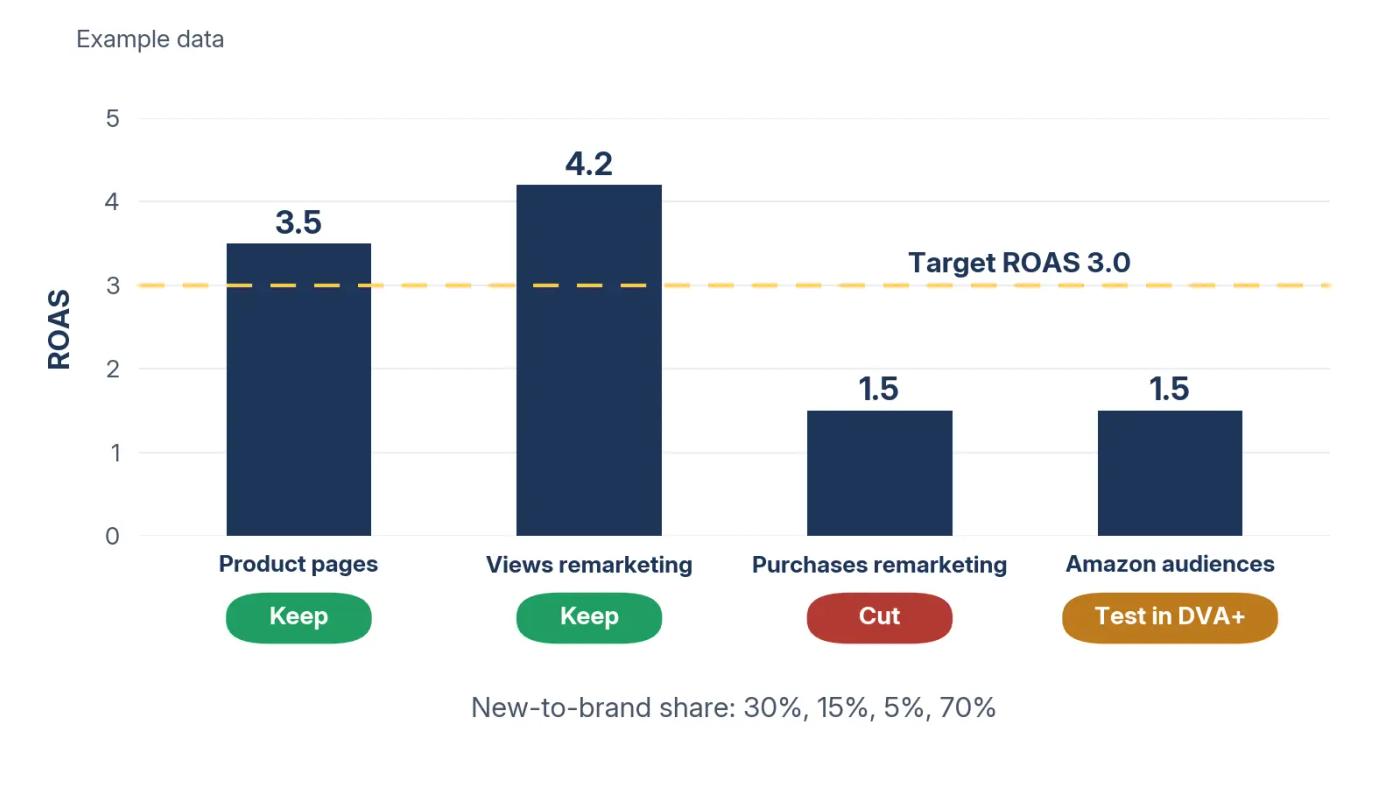
Purchases remarketing and Amazon audiences have the same ROAS here. They get different verdicts because 70% of the audiences job's orders came from new customers.
That is why our brand growth guide treats New-to-Brand orders as a growth signal, not a footnote. A high-ROAS retargeting job, by contrast, may be buying shoppers who would have come back anyway.
My working rule for each verdict
- Keep: ROAS at or above your target.
- Cut: ROAS below target with a low new-to-brand share.
- Test in DVA+: ROAS below target with a high new-to-brand share, or a job that needs video or streaming reach.
Set the target from your margins. Our cost breakdown shows how to find your break-even ACoS. Break-even ROAS is 1 divided by that rate, so a 33% break-even ACoS means a break-even ROAS of about 3.0. Your target shouldn't sit below it.
Watch TACoS across the account while you decide. If total ad spend rises and total sales don't, the new orders aren't adding up.
Do this: Build this scorecard for your four jobs. Mark each one Keep, Cut, or Test before you touch a budget.
Cap the test budget before you start
Display budgets can overshoot on a single day, so set guardrails first.
A seller on Amazon's Seller Forums titled a thread "Auto populated Sponsored Display campaign charged 50x my regular spending." Their post: "Within a few hours, I was billed over 50 times my usual spending amount." They said they found "a Sponsored Display campaign, which I had never created."
An Amazon community manager replied that bid prices "can fluctuate often." She added: "your daily budget is actually averaged over the course of a month."
How the budget rule works
Amazon's daily budget policy, dated May 9, 2023, covers Sponsored Display. Campaigns can "spend up to 100% more than the average daily budget on any given day." You can set that extra spend to 25% or 100% for all campaigns.
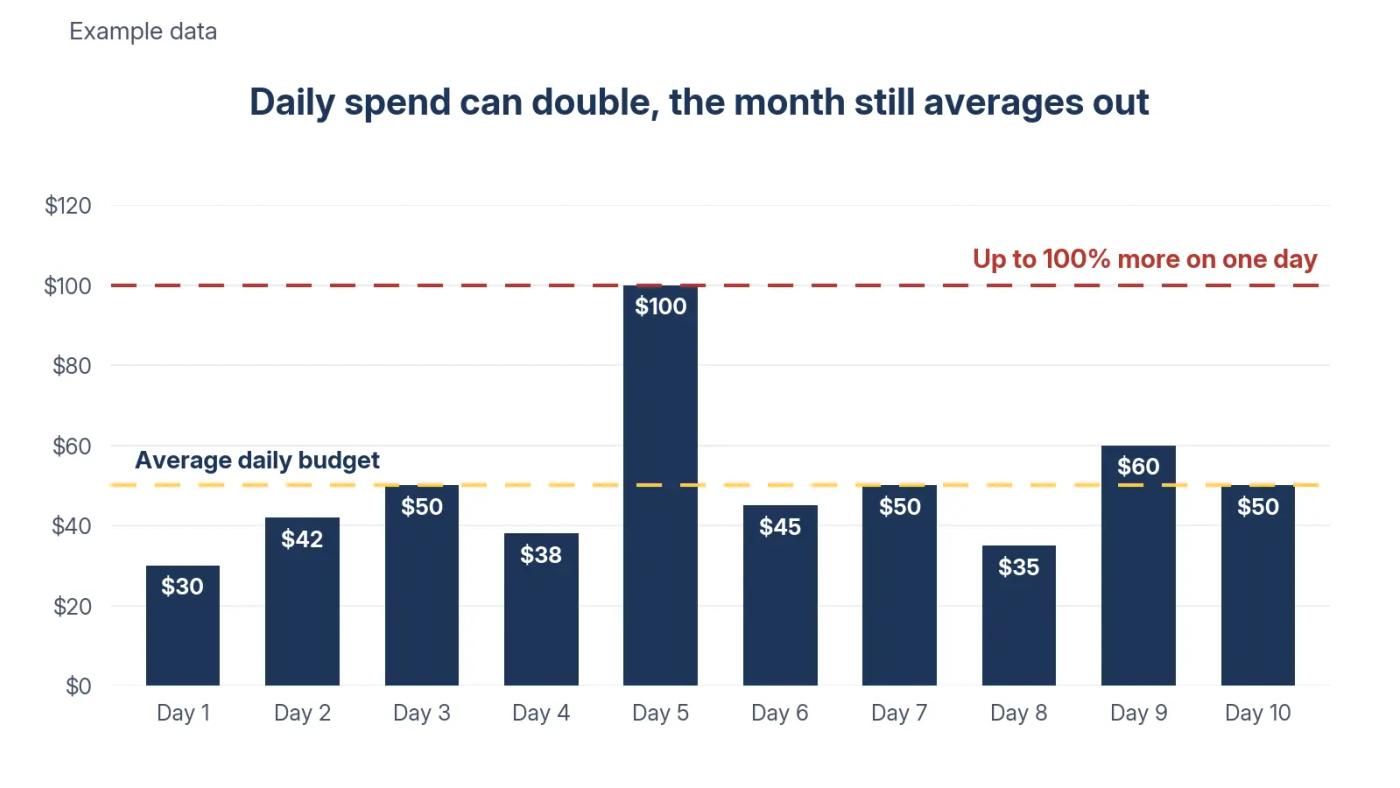
Example: a $50 daily budget can spend up to $100 on one day under the 100% setting. Over a 30-day month, the total still averages out to about $1,500.
My read: we don't know yet whether DVA+ follows the same rule. So cap any test at a monthly amount you can afford to lose, and check spend daily for the first two weeks.
Check the bid range against the budget
Her reply also offered advice. "We always suggest taking a look at the bid range you have set and making sure it is within your budget."
Here is why that matters. If every click cost the full $2 CPC bid, a $50 daily budget would cover 25 clicks. At a $10 bid, it would cover 5.
My read: five clicks a day is too few to judge a display job. Keep bids low enough that each day buys clicks you can learn from.
Do this: If your settings still offer it, set the extra spend option to 25% before any display test. Write down the monthly figure you won't go past.
Test DVA+ with one objective and one product set
A fair test changes one thing at a time.
PPC Land lists the DVA+ builder's four steps. You choose an objective, select products or enter a brand URL, review artificial intelligence (AI) generated creatives, and set a budget. After that, the system handles targeting, inventory, and bidding.
| Test element | Rule |
|---|---|
| Objective | One, matched to the Sponsored Display job you're replacing |
| Products | The same products the old job advertised |
| Budget | A fixed monthly cap |
| Length | Four to six weeks |
| Comparison | The old job's 90-day ROAS, new-to-brand share, and TACoS |
Our test design, not an Amazon requirement.
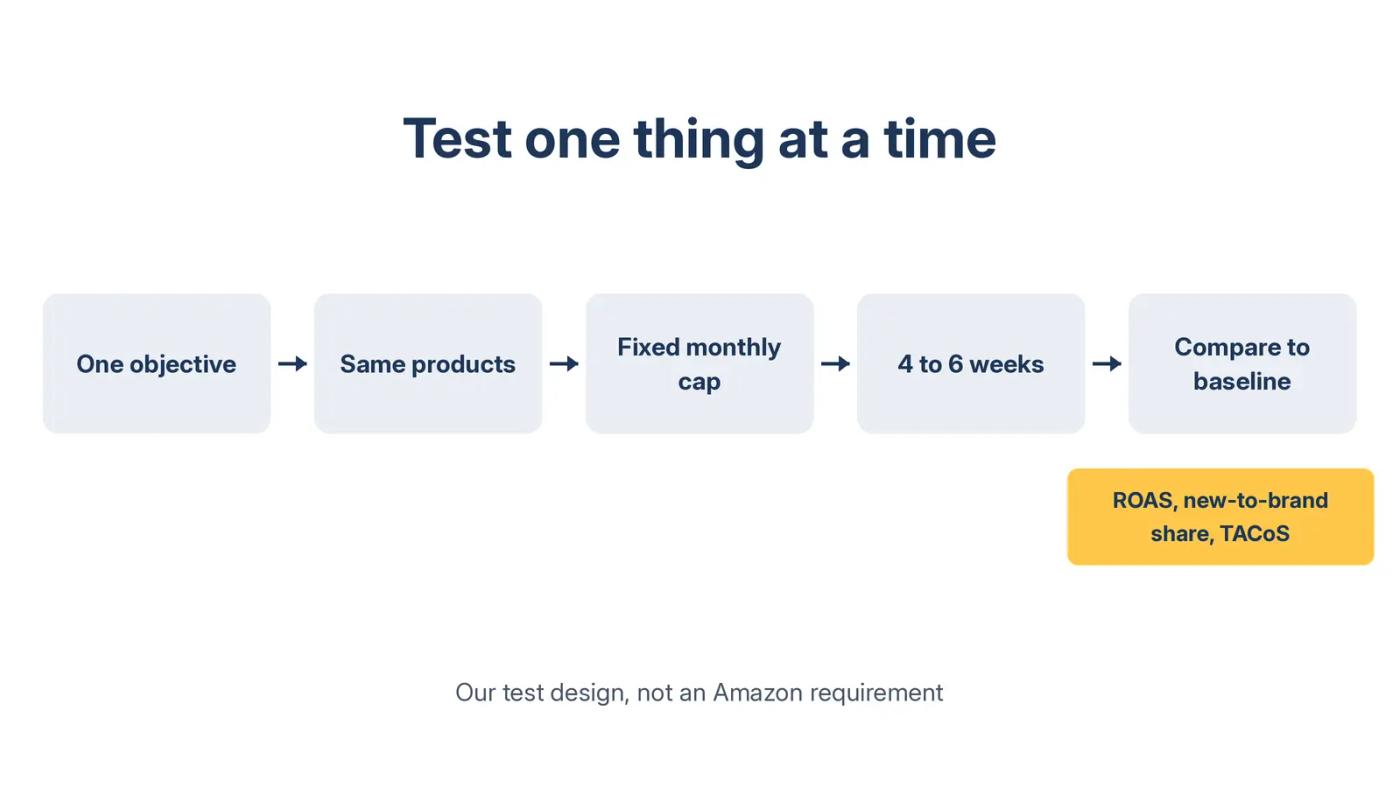
DVA+ picks inventory across streaming TV, video, display, and audio. If you also change products and creative, you won't know what moved the number.
My read: run the test in sequence, not alongside the old job. If both chase the same shoppers at once, they may compete and blur the result. Pause the old job for those products, or split products between the two.
Match the objective to the job
Choose the objective by the job you're replacing. The objective also decides which engine runs, so this choice shapes the whole test.
My working model: a product-page or remarketing job maps to sales. A new-shopper job maps to awareness or traffic, judged on new-to-brand orders. Skip leads unless your goal is sign-ups, not orders.
A mismatch spoils the result. An awareness campaign judged on ROAS will look like a failure even when it did its job. A sales campaign judged on reach looks weak for the same reason.
If you want a second pair of eyes on the plan, a senior Amplivus strategist can walk through it with you in 30 minutes.
Do this: Pick one job from your scorecard marked Test. Write its baseline numbers at the top of the test plan.
Save your Sponsored Display history now
Your baseline lives in reports you should own before the platform changes around them.
The display ads guide lists the four reports to keep: Campaign, Advertised product, Purchased product, and Targeting. Export 90 days of each, with the date range in the file name.
Do the same for streaming. DVA+ also takes in Sponsored TV, so save those results too if you ran it.
What goes in the baseline file
For each job, keep spend, sales, ROAS, orders, and new-to-brand orders. Add your account TACoS for the same 90 days.
Then note anything that moved results in that window: promotions, stockouts, price changes, or new listings. A DVA+ test that runs during a sale can't be fairly compared with a baseline that didn't.
Without a saved baseline, any DVA+ result looks good or bad only against memory. With one, it has to beat a number.
Do this: Export all four Sponsored Display reports for the last 90 days today. Store them outside Amazon, dated.
What you can't fix
You can't see DVA+ fees or minimums yet, so any test budget carries some guesswork.
You can't set bids by hand in the simplified version unless Amazon grants advanced settings.
You can't compare old and new results one to one, because inventory and optimization both change.
You can't plan around a migration date that hasn't been published.
And one limit on our side: we have no client DVA+ test results yet. This post uses Amazon's announcement and trade press reporting.
Your Sponsored Display checklist
- [ ] Export 90 days of Campaign, Advertised product, Purchased product, and Targeting reports
- [ ] Tag every target with one of the four jobs
- [ ] Check lookback windows and rival ads on your product pages
- [ ] Build the scorecard: spend, sales, ROAS, new-to-brand share
- [ ] Mark each job Keep, Cut, or Test
- [ ] Set the extra spend option to 25% where available
- [ ] Write a DVA+ test plan with one objective and a monthly cap
- [ ] Ask your Amazon contact, in writing, about migration timing, fees, and minimums
- [ ] Request advanced settings if you want manual bids
- [ ] Track TACoS across the account during the test
Where we fit
We're an Amazon PPC agency for brands spending $10K or more a month, and display is one of the ad types we manage.
Want a second read of your Sponsored Display numbers before DVA+ reaches your account? Ask for a free Amazon PPC audit. Within 24 hours, you get a written read of spend across Sponsored Products, Brands, and Display. No pitch.
If you spend under $10K a month on ads, build the scorecard yourself first.
Authoritative resources
- Amazon unBoxed 2026 recapAmazon's own description of DVA+ and Amazon Ads Agent.
- Digiday on unBoxed 2026How DVA+ brings Sponsored Display, Sponsored TV, and programmatic buying together.
- MediaPost on Amazon Ads AgentThe three campaign types and the Full-Funnel budget minimum.
- PPC Land on the DVA+ betaThe four-step builder, beta stages, eligibility, and access tiers.
- Amazon display ads guideTargeting options, billing models, and downloadable reports.
- Seller Forums 50x spend threadThe 50x billing case and Amazon's budget explanation.
- Amazon daily budget policyThe May 9, 2023 rule on daily overspend and monthly averaging.