In this guide
- Decide in five steps
- A seller found an Off Amazon row with zero orders
- Your campaigns opted in by default
- Creator placements raised the stakes on August 10, 2026
- Read the Off Amazon row before you decide
- Zero orders only counts after enough clicks
- Keep, limit, or cut with one rule per campaign
- Watch your daily budget, not just ACoS
- Treat inferred search terms with care
- What you can't fix
- Your off-Amazon checklist
- Where we fit
- Authoritative resources
- Frequently asked questions
Key takeaways
How to judge Sponsored Products ads that run off Amazon, including creator placements, and how to decide whether to keep, limit, or cut them.
- Amazon has shown Sponsored Products ads on outside apps and websites since October 25, 2023.
- Sellers report that the "Increase reach" off-Amazon setting comes switched on by default.
- Since August 10, 2026, campaigns can also serve through creators in the Amazon Influencer Program.
- Top of search and product page bid adjustments don't apply to off-Amazon placements.
- Off-Amazon results sit in their own "Off Amazon" row in the Sponsored Products placement report.
You can't fully switch off Amazon's off-site placements from the campaign screen. You can measure them, limit them, or ask Ads Support to take you out.
That matters more since August 10, 2026. Sponsored Products campaigns can now also show through creators, at the bids and budgets you already set.
Should you keep, limit, or cut off-Amazon and creator placements? Decide campaign by campaign, from the Off Amazon row in your placement report. Keep the reach setting where those clicks earn orders at your target advertising cost of sales (ACoS). Limit it where they don't. Cut it only after enough clicks show zero orders.
Decide in five steps
- Pull the Sponsored Products placement report and find the Off Amazon row.
- Compare its ACoS and conversion rate with your other placements.
- Check whether zero orders is real or just too few clicks.
- Set each campaign to "Increase reach" or "Limit off-Amazon spend."
- Recheck after every Amazon notice, starting with the August 10, 2026 creator change.
New to campaign types? Our pay-per-click (PPC) guide explains how automatic campaigns choose keywords and products for you. That matters here, because one seller in this story spotted the problem in auto campaigns.
A seller found an Off Amazon row with zero orders
The warning came from Amazon's own Seller Forums, in a thread titled "Warning: Check Your Sponsored Products Campaigns NOW." The original poster said the off-Amazon setting was "auto-enabled by default." They called the destinations "junk apps and sites where nobody is shopping."
The report that settled it
Another seller ran the numbers. Their route was Campaign Manager, then Reports, then a Sponsored Products placement report. The file showed an "Off Amazon" row next to Top of Search, Rest of Search, and Product Pages.
Their result: "In our case, over the last 90 days those off-Amazon ads returned exactly zero orders."
What other sellers saw
One seller watched ACoS jump on auto campaigns. "I noticed some of my auto campaigns started going from under 30% acos to over 100%." Another objected to the controls: "Being forced to 'reduce' instead of opt out fully is unacceptable."
Not everyone lost money. One reply read: "Fortunately, it works perfectly for me but I got lucky."
That split is the point. Off-Amazon traffic is not good or bad by default. It is untested until you read your own row.
What one thread can and can't tell you
One thread is a handful of sellers, with no categories or budgets attached. It proves the problem is real for some accounts. It can't tell you how common it is, or whether your products behave the same way. Your own report answers that.
Do this: Download a Sponsored Products placement report for the last 90 days today. Find the Off Amazon row for each campaign.
Your campaigns opted in by default
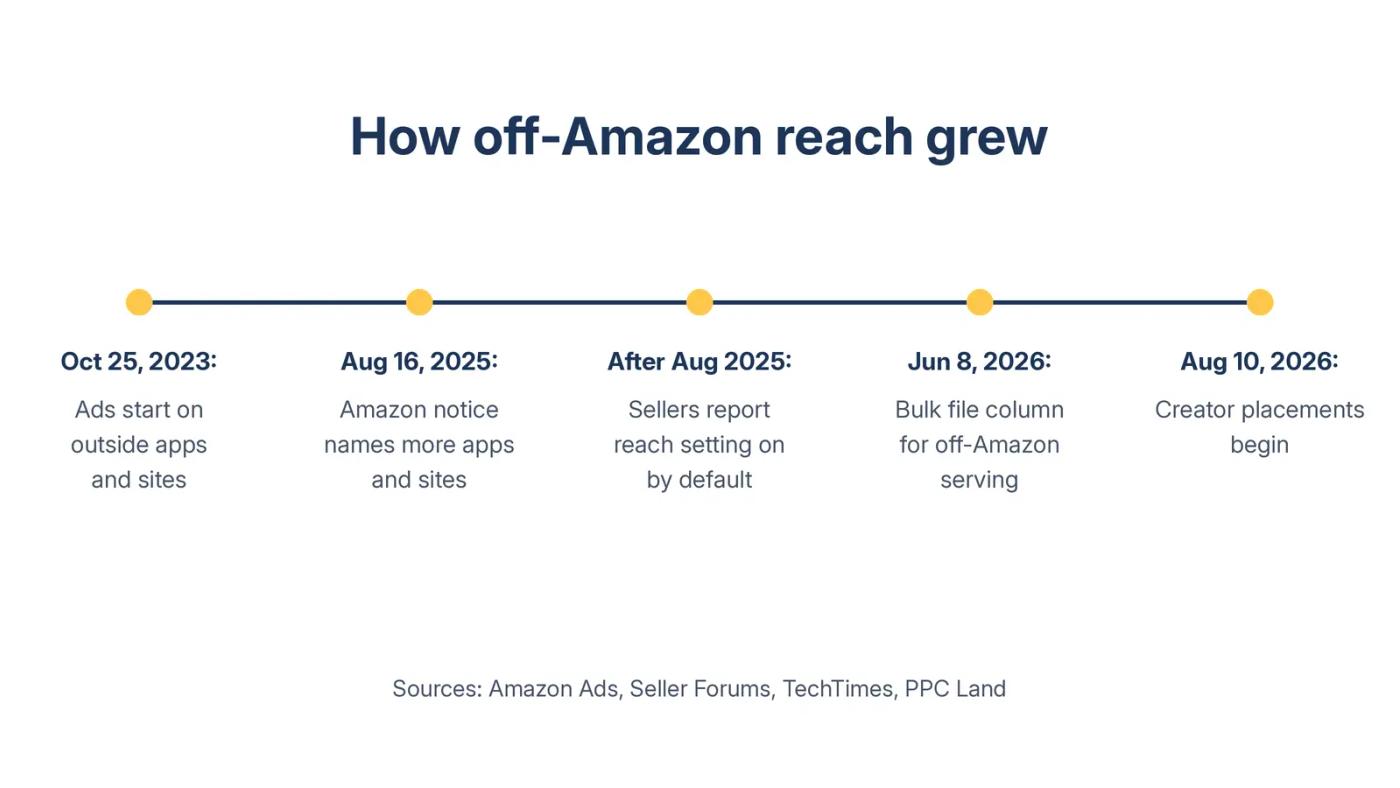
Most sellers never chose off-Amazon reach. Amazon added it, then widened it, in steps.
| Date | What changed | Source |
|---|---|---|
| October 25, 2023 | Sponsored Products ads start on outside apps and websites in the US | Amazon Ads announcement |
| August 16, 2025 | Amazon notice: "Pinterest, BuzzFeed, and more apps and websites will start to show Amazon Sponsored Product ads" | Amazon community manager, Seller Forums |
| After that notice | Sellers report the "Increase reach" setting on by default | Seller Forums |
| June 8, 2026 | US bulk files gain an off-Amazon ad serving column | TechTimes, August 11, 2026 |
| August 10, 2026 | Creator placements begin, at existing bids and budgets | PPC Land, August 4, 2026 |
Amazon's launch announcement named Pinterest, BuzzFeed, Hearst Newspapers, Raptive, and Ziff Davis brands. It said Amazon would "start small, learn, and expand."
It did. Amazon's Sponsored Products page now says the ads promote listings on Amazon "and select premium apps and websites."
The same page describes the reach in its own words. Ads can appear on "other Amazon-owned and operated sites as well as third-party destinations." Off-Amazon reach is part of the product design now, not a side test.
If someone runs your Amazon PPC management, ask when they last checked this setting on every campaign. A default nobody reviews is still a decision, just not yours.
Do this: Open each campaign's settings and note whether it says "Increase reach" or "Limit off-Amazon spend." Write the answer next to its Off Amazon row.
Creator placements raised the stakes on August 10, 2026
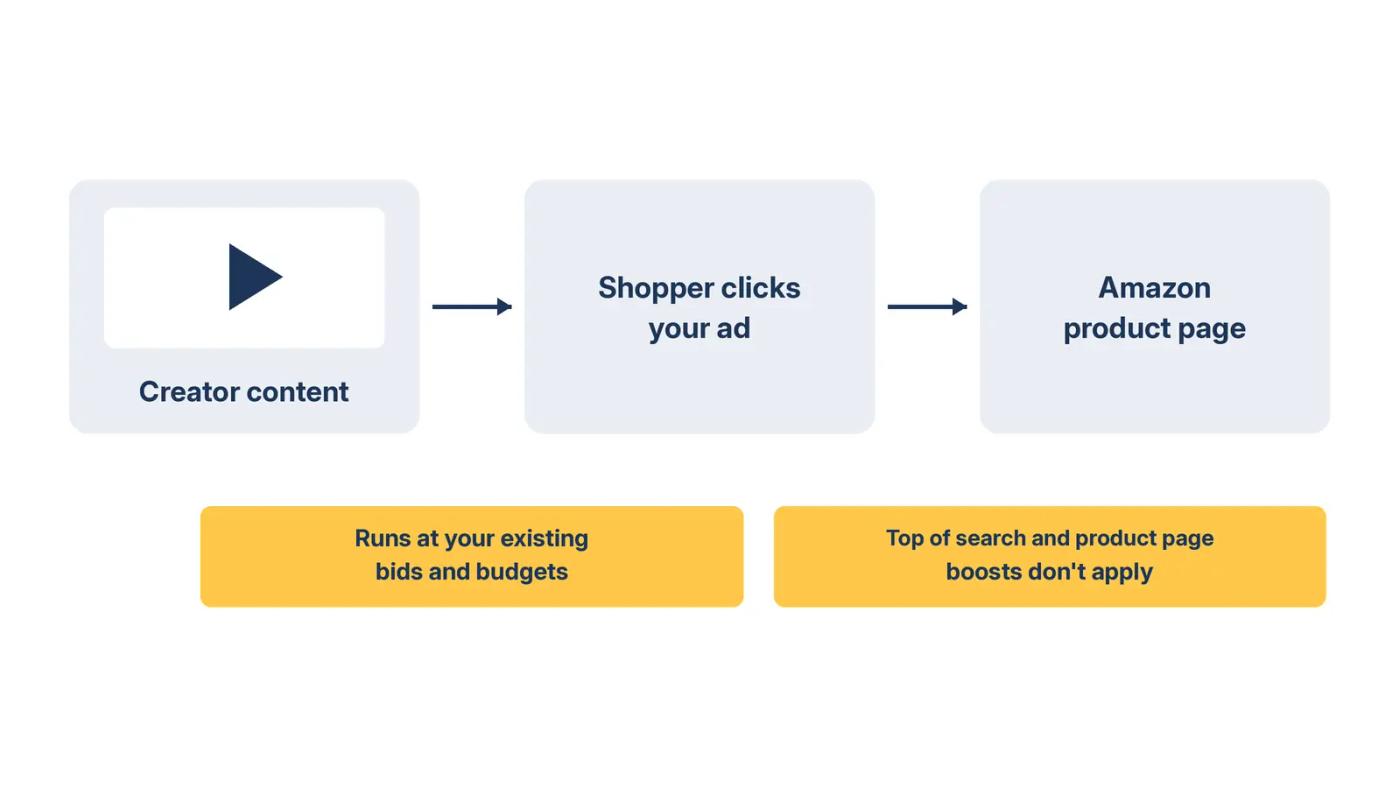
Your products can now appear inside creator content, on the bids you set for search.
PPC Land reported on August 4, 2026 that Amazon had updated its support article, "Understand Sponsored Products off-Amazon advertising." From August 10, campaigns could appear through creators in the Amazon Influencer Program. Campaigns were enrolled by default, at their existing bids and budgets.
Who the creators are
Amazon calls its Influencer Program "an extension of Amazon's broader affiliate network." Creators apply with a qualifying YouTube, Instagram, TikTok, Pinterest, or Facebook account.
What changes for your bids
Per the same report, "Increase reach" is the default setting, and "Limit off-Amazon spend" limits delivery off Amazon. Your bid adjustments for Top of Search and Product Pages do not apply off Amazon. So a 200% top of search boost does nothing for these clicks.
New campaigns start on the default
Any campaign you launch starts on "Increase reach," the default named in the support article. Add the setting to your launch checklist, or every new campaign reopens the question.
Where the clicks land
Clicks from outside placements go to your Amazon product page. Amazon's 2023 announcement said these ads link to the product page and only appear when the advertised item is in stock.
Brands selling outside the US should check each market. TechTimes noted that markets without creator inventory, including the UK, were not affected by the August rollout.
Creator content is a reach play. Our brand growth guide argues for judging ads on discoverability, not raw sales. Even so, reach has to show up somewhere you can measure.
Do this: Mark August 10, 2026 on your placement report. Compare the Off Amazon row for the 30 days before and after that date.
Read the Off Amazon row before you decide
The placement report is the one place this traffic shows its cost.
Amazon's 2023 announcement said it plainly: "Reporting will be available in the Sponsored Products placement report." Here is how one campaign's row might read. These are example numbers, not client data.
| Placement | Spend | Clicks | Orders | Sales | ACoS | Conversion rate |
|---|---|---|---|---|---|---|
| Top of Search | $3,200 | 2,100 | 210 | $8,400 | 38% | 10.0% |
| Rest of Search | $1,100 | 900 | 63 | $2,520 | 44% | 7.0% |
| Product Pages | $900 | 800 | 40 | $1,600 | 56% | 5.0% |
| Off Amazon | $480 | 400 | 0 | $0 | No sales | 0% |
Example data only, one campaign, 90 days. ACoS = spend ÷ sales. Conversion rate = orders ÷ clicks.
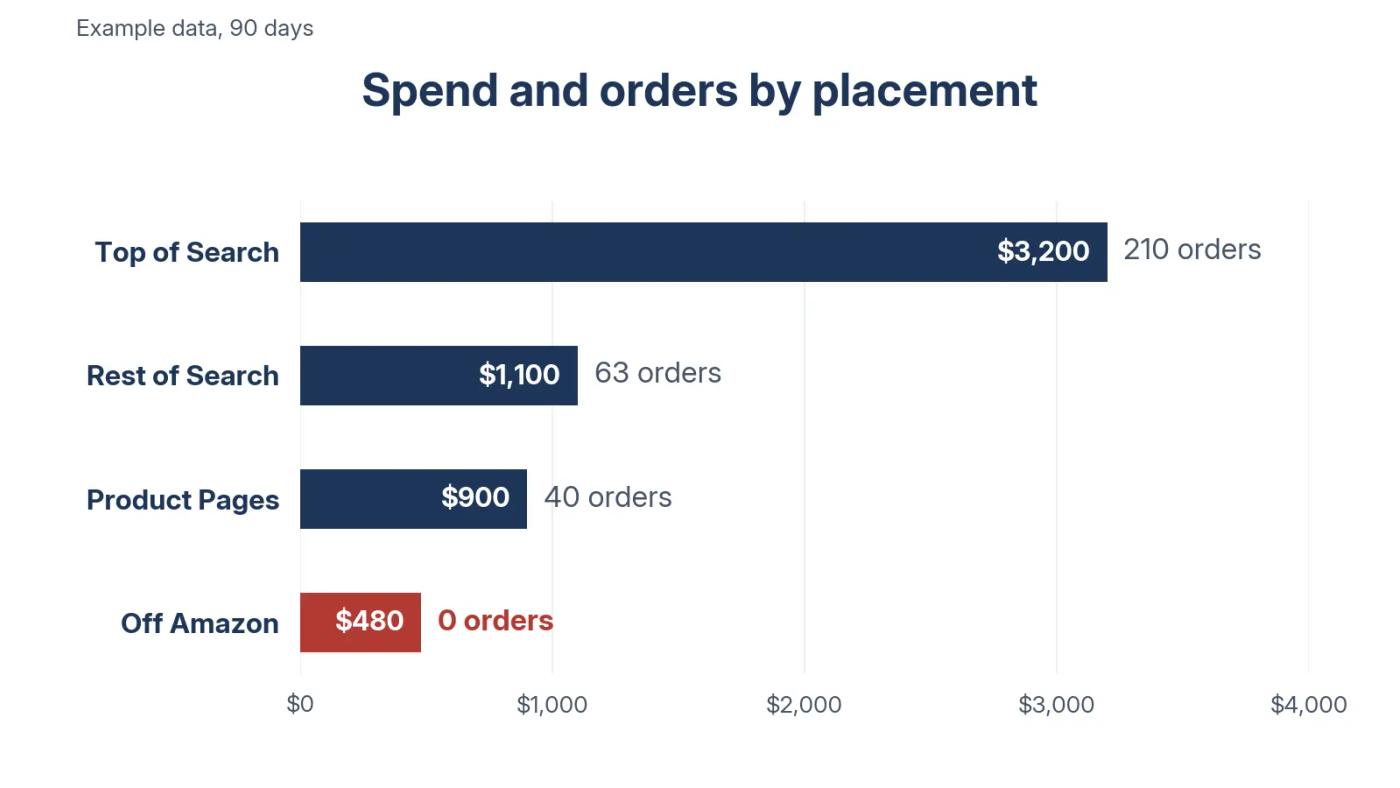
In this example, off-Amazon clicks cost $1.20 each and took 8% of spend. They returned zero orders.
That spend is still part of your Amazon PPC cost, even if nobody chose it. It also drags the campaign's blended ACoS up, which can push you to cut bids on search terms that work.
Run the example. With the Off Amazon row, the campaign's ACoS is 45.4%. Without it, the same campaign runs at 41.5%. Nearly four points of ACoS came from clicks that never bought.
Compare like with like
Product Pages is the fairest comparison. Neither placement starts with a shopper typing a search.
In the example, Product Pages converted at 5.0% and Off Amazon at 0%. Top of Search at 10% is not a fair yardstick, because those shoppers were already looking for the product.
Do this: Add conversion rate, orders divided by clicks, to each row of your placement report. Circle the Off Amazon row.
Zero orders only counts after enough clicks
A few clicks with no orders proves nothing. A few hundred does.
Ask one question. If off-Amazon clicks converted like your normal clicks, how likely is zero orders by chance? The answer is (1 minus your conversion rate) to the power of the clicks.
| Clicks with zero orders | Chance at a 10% conversion rate | Chance at a 5% conversion rate |
|---|---|---|
| 20 | 12% | 36% |
| 30 | 4% | 21% |
| 50 | 0.5% | 8% |
| 100 | Under 0.01% | 0.6% |
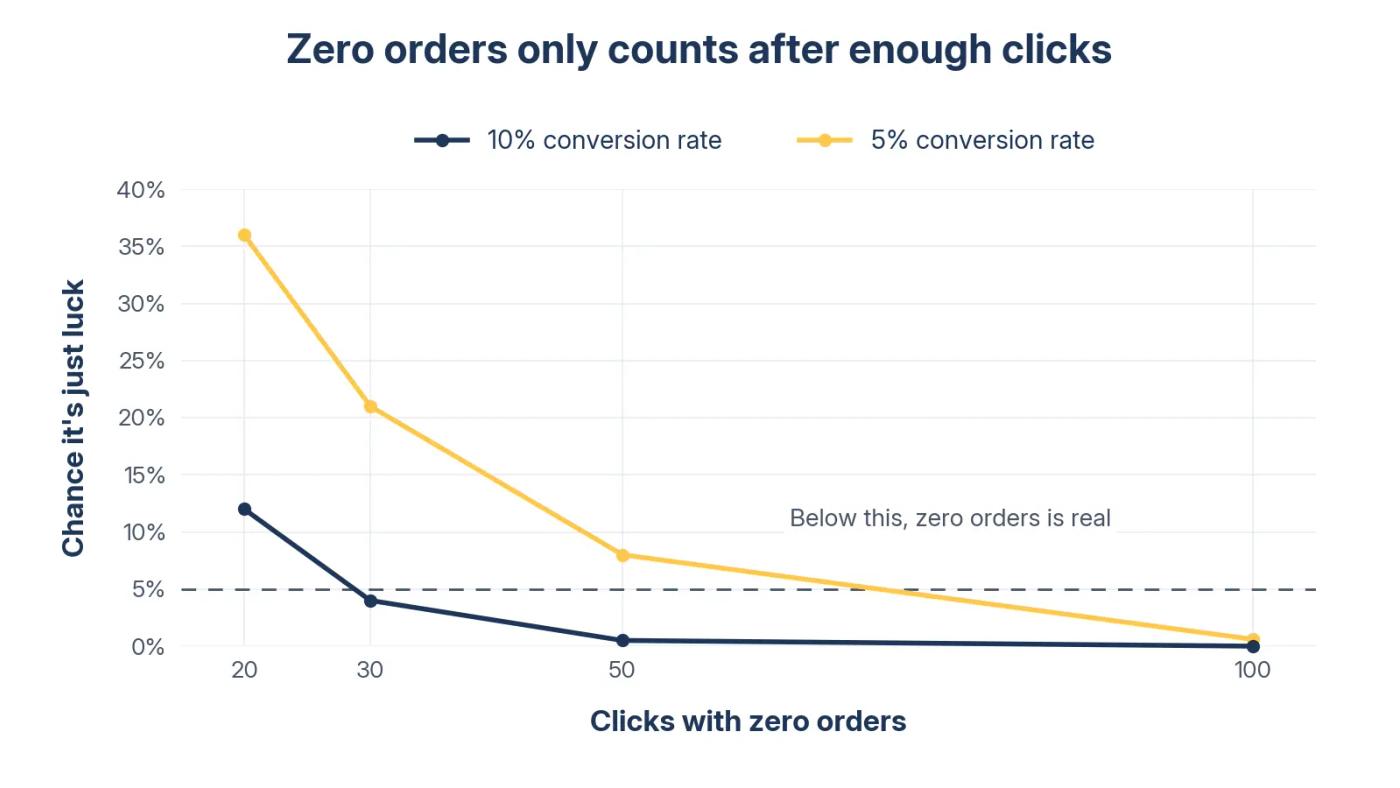
For a quick line, divide 3 by your conversion rate. At 10%, that is 30 clicks. At 5%, it is 60. Statisticians call this shortcut the rule of three.
Use your campaign's own rate
Use the conversion rate of the campaign's Amazon placements, not an account average. In the example, 313 orders on 3,800 Amazon clicks is about 8.2%. Three divided by 8.2% is about 36 clicks.
The Off Amazon row had 400 clicks, more than ten times the line. That is not bad luck. Those clicks were not buying.
Recheck the math each month, because the line moves when your conversion rate does.
If your row sits near the line, talk it through in an Amazon strategy session. It is 30 minutes with a senior strategist.
Do this: Divide 3 by each campaign's normal conversion rate. If the Off Amazon row has more clicks than that and zero orders, mark it Cut.
Keep, limit, or cut with one rule per campaign
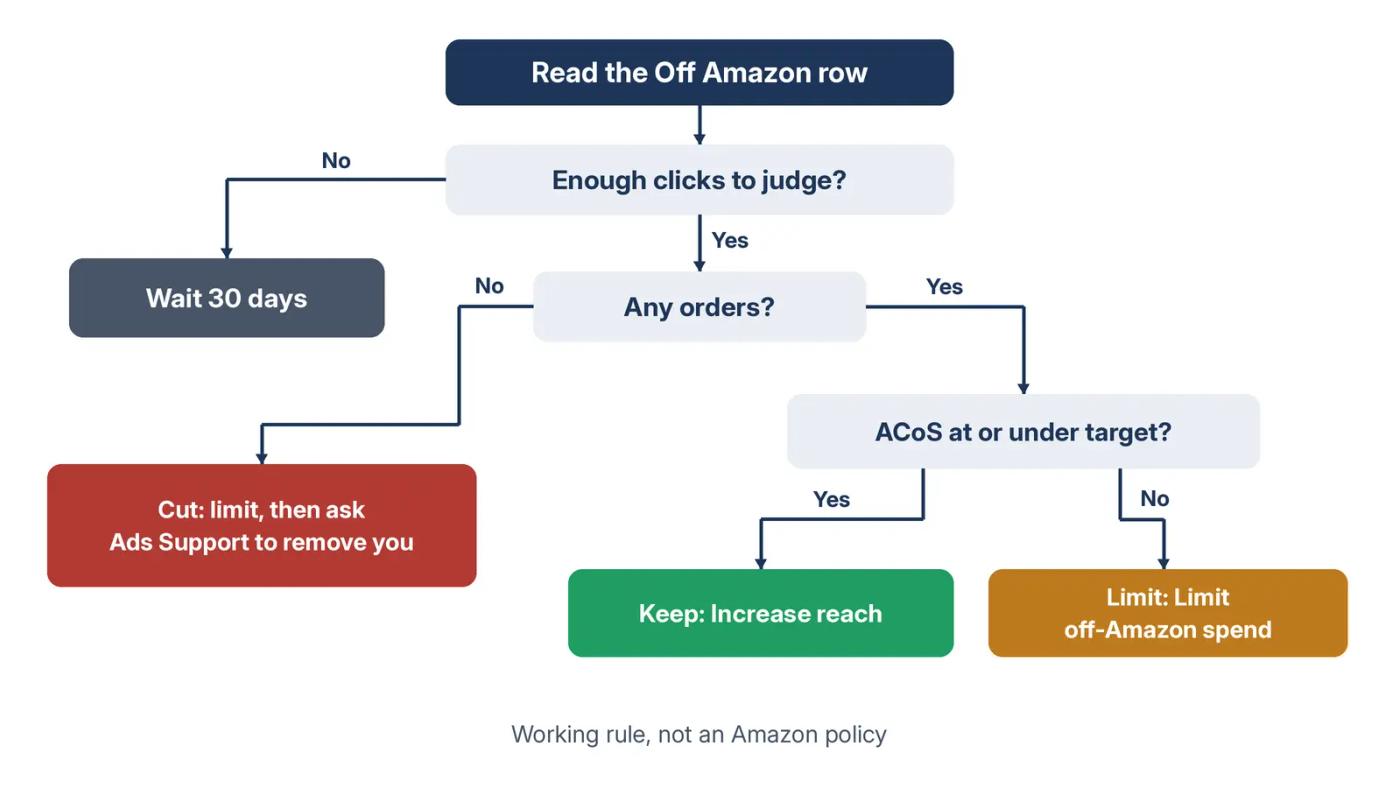
Every campaign gets one decision, based on its own row.
| What the Off Amazon row shows | Decision | Setting |
|---|---|---|
| Orders at or under your target ACoS | Keep | Increase reach |
| Orders, but ACoS above target | Limit | Limit off-Amazon spend |
| Zero orders after 3 ÷ conversion rate clicks | Cut | Limit, then ask Ads Support to remove you |
| Too few clicks to judge | Wait | Recheck in 30 days |
How each setting works
"Limit off-Amazon spend" limits delivery. It does not promise zero, which is why one seller called it being forced to "reduce."
For a full exit, an Amazon community manager in the same forum thread said the team confirmed "a path to opt out." The step: "open a case with Ads Support and request to be removed from this."
To change many campaigns at once, use a bulk file. The same TechTimes report says US bulk files have carried an off-Amazon ad serving column since June 8, 2026.
Test before you cut across the account
Don't flip every campaign on day one. Pick two similar campaigns with weak Off Amazon rows. Limit one and leave the other on "Increase reach."
After four weeks, compare total orders, spend, and ACoS for both. If the limited campaign kept its orders and spent less, roll the change out. If its orders fell, check its Amazon placements before you blame the setting.
When you want reach on purpose
If you want reach beyond Amazon by design, Sponsored Display is built for it, with its own targeting and reporting.
Our ad types guide shows it reaching shoppers on and off Amazon, on purpose rather than by default.
Do this: Put every campaign in one row of the decision table. Change the settings in one bulk upload, then note the date.
Watch your daily budget, not just ACoS
Off-Amazon clicks spend from the same daily budget as your search placements.
TechTimes reported that creator placement clicks are billed per click against the campaign's daily budget. Nothing reserves money for search first.
My read: if off-Amazon clicks arrive early in the day, a campaign can run dry before later shoppers search. The loss shows up as missing search clicks, not as a bad Off Amazon row.
Example: a campaign with a $100 daily budget spends $15 off Amazon and runs out at 6 p.m. That $15 could have bought search clicks later in the day. These are example numbers, not client data.
To check it, open the campaign list and look for campaigns marked out of budget. For each one, compare its Off Amazon spend share for the weeks before and after August 10, 2026. A rising share on a capped budget is the pattern to fix first.
Do this: List every campaign that ran out of budget in the last 30 days. Check its Off Amazon spend before you raise its budget.
Treat inferred search terms with care
Some "search terms" in your report may never have been typed by a shopper.
The same TechTimes report quotes Amazon's off-Amazon documentation. When a placement has no search behind it, Amazon will "infer and provide a search term with customer context that best matches the advertised product." TechTimes reported that these inferred terms show up in the standard search term report.
My read: a term that looks like a winner may come from creator content, not search. Harvesting it into exact match copies an off-Amazon guess into your search campaigns. Negating it may cut off-Amazon clicks you can't see by name.
Read every search term report with this in mind before you harvest or negate.
Keep a list of odd-looking terms
Start a short list of terms that read oddly, such as long phrases no shopper would type. Watch whether they still appear after you limit off-Amazon spend. My read: if they vanish, they came from outside placements.
Do this: Before you move a search term into exact match, check two things. It has orders, not just clicks, and it reads like a real shopper search.
What you can't fix
You can't pick, in advance, which outside sites or creator posts carry your ads.
You can't apply your placement bid adjustments off Amazon.
You can't see creator-level results in any public documentation we found, so you judge the Off Amazon row as one block.
You can't prove a halo. If an off-Amazon click leads to a purchase outside the attribution window, the report won't show it.
And one limit on our side: this post uses seller reports, Amazon notices, and trade press. We have no client data here and have not measured off-Amazon results across accounts.
Your off-Amazon checklist
- [ ] Download a 90-day Sponsored Products placement report
- [ ] Find the Off Amazon row for every campaign
- [ ] Add conversion rate and ACoS to each row
- [ ] Note each campaign's off-Amazon setting
- [ ] Compare the 30 days before and after August 10, 2026
- [ ] Apply the keep, limit, or cut rule
- [ ] Open an Ads Support case where you want a full opt-out
- [ ] Check new search terms for orders before harvesting
- [ ] Recheck after every Amazon notice
Where we fit
Amplivus runs Amazon ads for brands spending $10K or more a month. Our management tracks every bid, keyword, and placement, including the rows nobody chose.
Want an outside read of your placement report before fourth-quarter (Q4) spend peaks? Our free audit is a written diagnosis with a prioritized action list, delivered in 24 hours. No pitch.
If your Off Amazon row is a few dollars a month, skip this and fix your bigger rows first.
Authoritative resources
- Seller Forums thread on off-Amazon adsThe zero-orders report, the default setting warning, and Amazon's opt-out path.
- Amazon Ads launch announcementSponsored Products on outside apps and websites, October 25, 2023.
- Amazon Ads Sponsored Products pageWhere Sponsored Products ads can appear today.
- PPC Land on creator placementsThe August 10, 2026 creator rollout and campaign settings.
- TechTimes on creator placementsInferred search terms and the bulk file column.
- Amazon Influencer Program explainerWho creators are and how they earn.